
Fix sign-in trouble
Expired links, 'No active tours found', looking up your tour by its Tour ID, which email to use, and 'Whose email address is this?'.
Can't get in, or signed in as the wrong person? Most sign-in trouble comes down to the email address: sign in with the one Passports has for you, and PassportsGo sends a code to it. Your tour's Tour ID shows you the tour and how to enroll, but it doesn't sign you in.
If you're already in but seeing the wrong things, the last step shows how to check which account you're using.
Before you start
- The email address on your enrollment: the one your Passports emails come to.
- Your Tour ID, if you want to look up your tour. It's in your Passports welcome materials and looks something like MAPLEWOOD2026.
- Step 1
Check the email you used
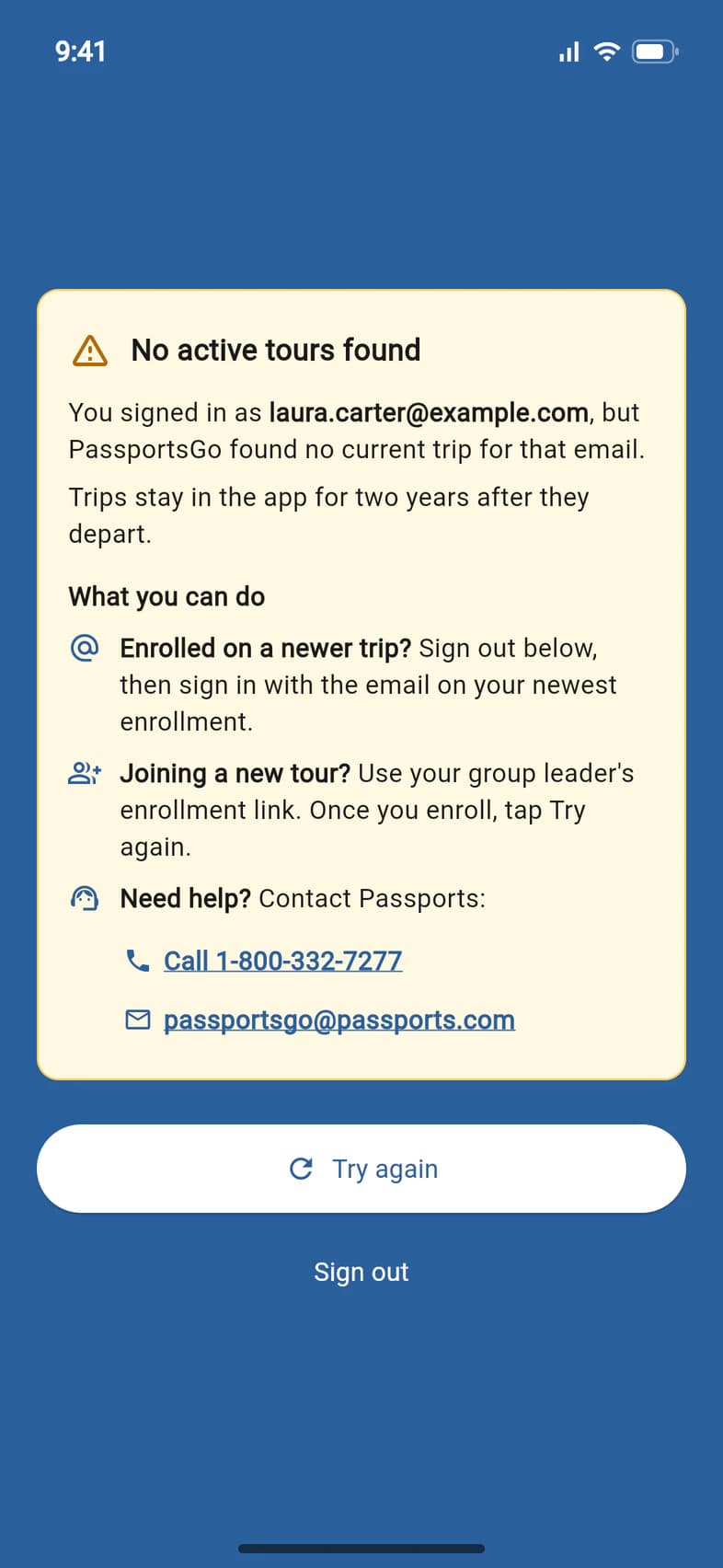
Entered your code, and after Checking your trips... PassportsGo says No active tours found 1? You're still signed in. The box shows the email address you signed in with 2: PassportsGo found no current trip for it. Trips stay in the app for two years after they depart.
Under What you can do: enrolled on a newer trip 3? Tap Sign out 4, then sign in with the email on your newest enrollment. Joining a new tour? Use your group leader's enrollment link, then tap Try again once you've enrolled. Or call Passports at 1-800-332-7277, or email passportsgo@passports.com.
After Sign out, the sign-in screen keeps the same box at the top until you close it or sign in again.
- Step 2
Look up your tour
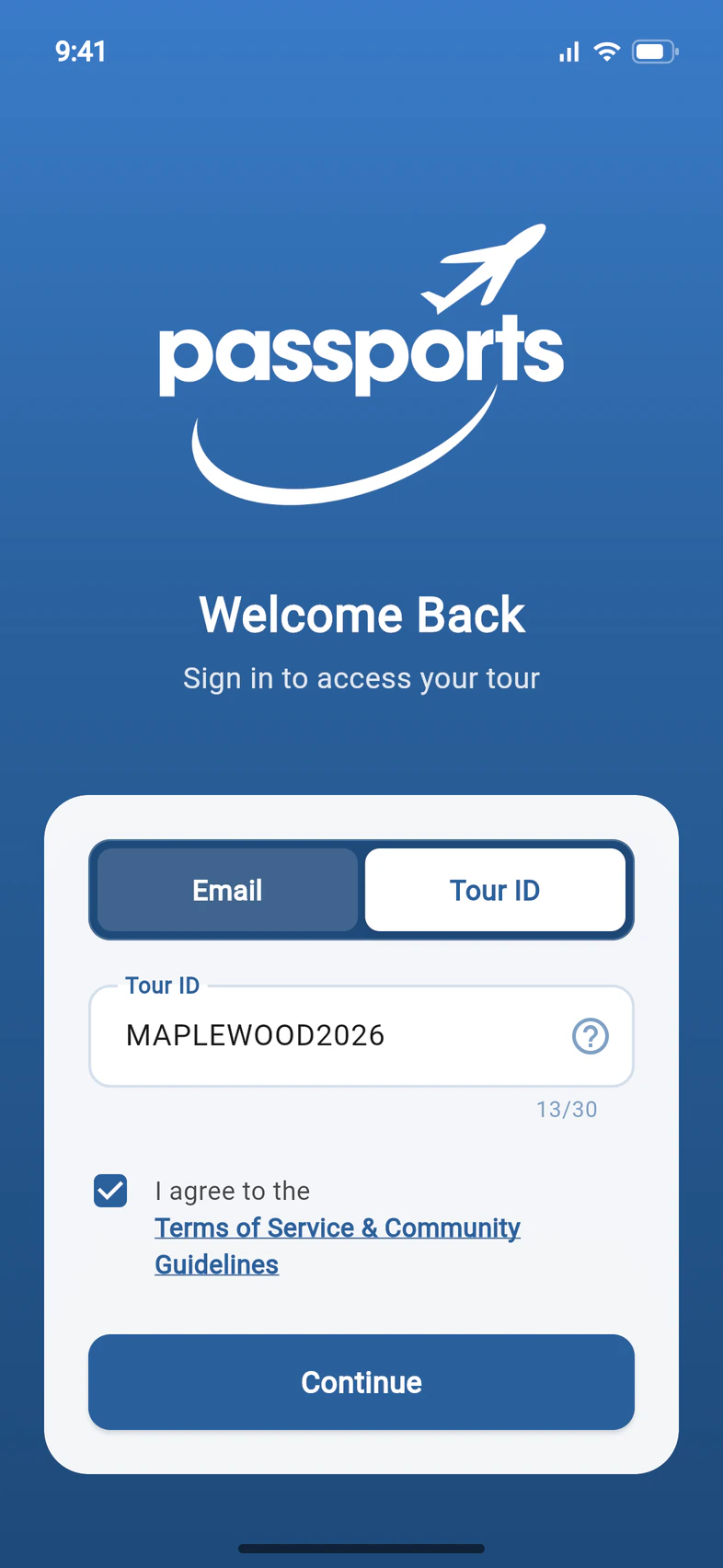
Not sure you have the right tour? On Welcome Back, tap Tour ID 1 and type your Tour ID 2. Tick the terms box, then tap Continue 3.
- Step 3
Read your tour's page
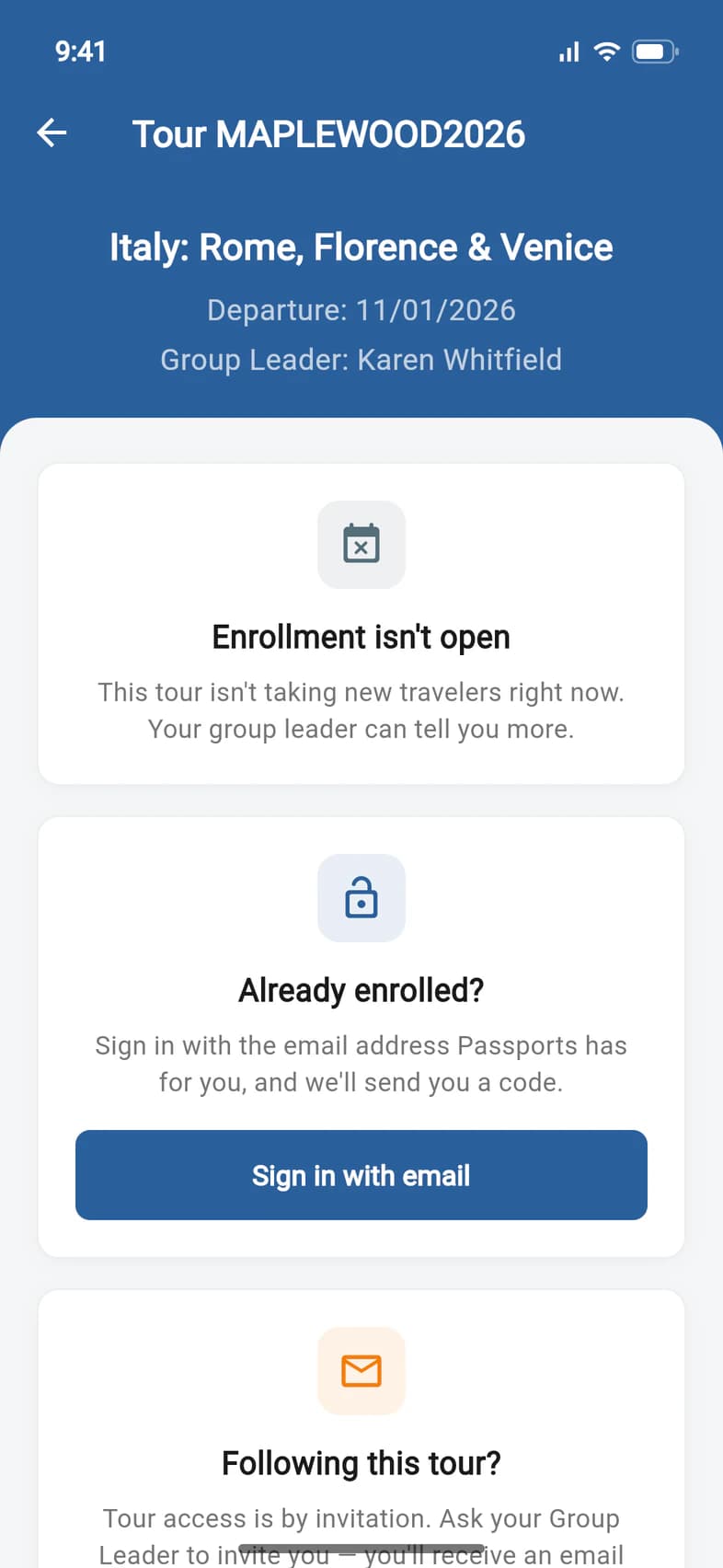
Your tour's page shows its name, departure date and group leader 1. It never lists the people on the tour, and it doesn't sign you in.
- Already enrolled? Tap Sign in with email 2: you're back on the sign-in screen, where you sign in with the email address Passports has for you.
- Joining this tour? Enroll at passports.com opens the tour's enrollment page while enrollment is open. Otherwise the card says Enrollment isn't open 3.
Not on the tour yourself, just following along? Following this tour? on the same page explains that access is by invitation: ask your group leader to invite you.
- Step 4
Check you're in the right account
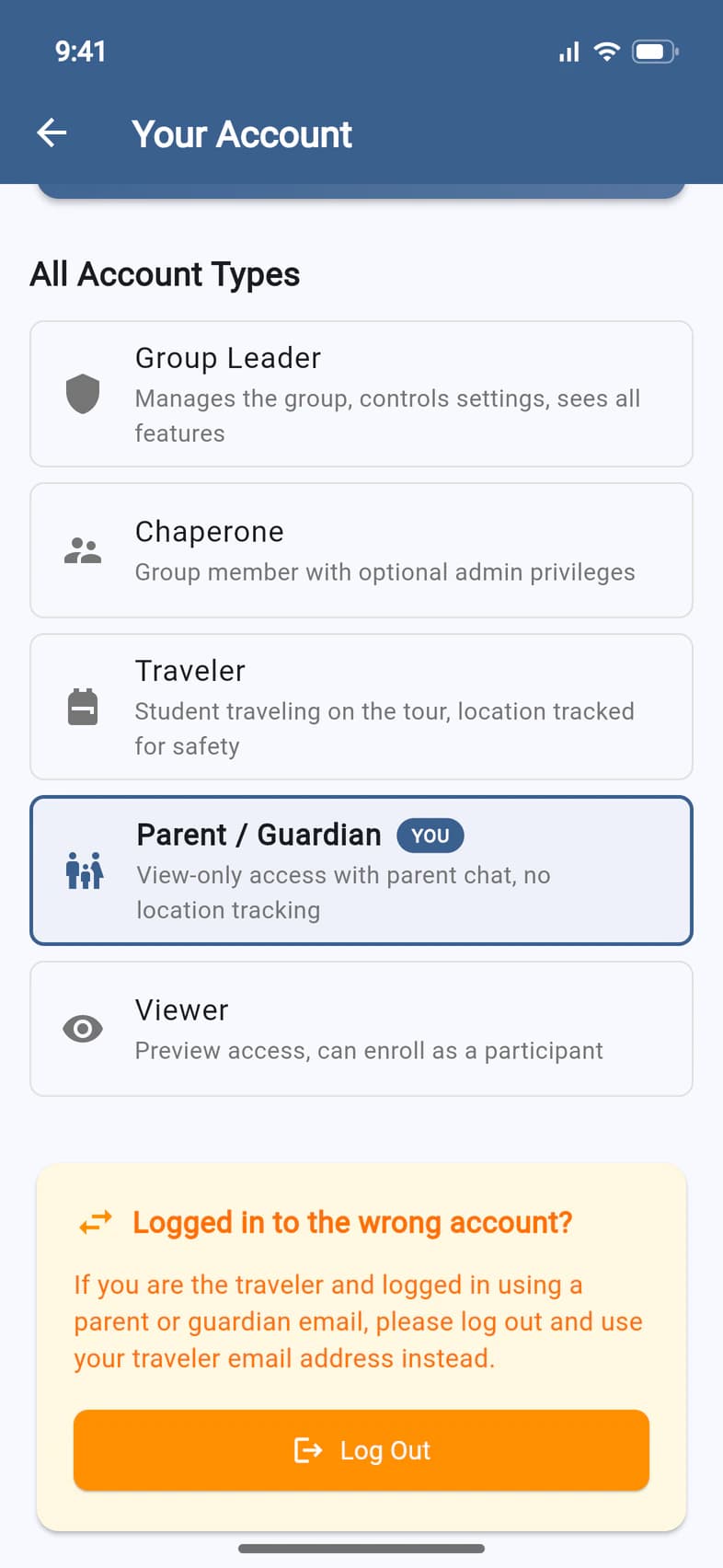
Signed in but seeing the wrong things, like a grayed-out Finance when you're the parent, or a traveler seeing parent messages? On Home, tap the label under your tour's name (for example PARENT / GUARDIAN). Your Account shows which kind of account you're signed in with.
If it's the wrong one, go to Logged in to the wrong account? 1, tap Log Out 2, and sign in again with the other email address.
Parents and travelers should each use their own email address. A parent signed in with the traveler's address can interfere with the traveler's notifications and location sharing.
Good to know
My sign-in link says it's no longer valid.
A sign-in link from PassportsGo works for up to 30 days. After that it says This link is no longer valid: sign in with your email address and a code instead. Links from the old my.passports.com, in old emails and ticket notifications, no longer sign you in from October 19, 2026: they open PassportsGo, where you sign in the same way.
I chose Text Message, but no code came.
On the code screen, tap Didn't get a text? Email me the code: a new code goes to your email address. Texts can't reach a phone that once replied STOP to a text from Passports. On a phone outside the US and Canada, the code comes from "Passports" instead of a phone number, and you can't reply to it.
No email from Passports ever arrives, not even my sign-in code.
If one of our emails to that address was once marked as spam, our emails can't reach it any more: no tour updates, sign-in codes or Helpdesk replies. If Passports has your mobile number, sign in with Text Message instead; if not, call Passports at 1-800-332-7277.
Once you're in, Home shows a red strip, We can't email you, naming your address. Tap Get our emails again, then Yes, email me, and our emails reach you again. That works once per address: after a second spam report, the strip asks you to contact us instead, with Contact us to open the Helpdesk. Each person sees only their own address, never their traveler's.
Can I sign in with my Tour ID?
No. A Tour ID is printed on posters and flyers, so it opens only the tour's page, never the names of the people on it. Sign in with your email address and a code. If that doesn't work, call Passports at 1-800-332-7277.
It says No tour found with that Tour ID.
Check the Tour ID with your group leader, letter by letter. A tour that was canceled or has already traveled isn't found either.
The traveler and I share one email address.
Fix it yourself: open My Account, then the traveler's page, and tap Signed in as … under their name. On Sign-in & Finance, say who uses the address and give the other person their own; PassportsGo shows what will change before you tap Save. A traveler 18 or older who pays for their own trip can pick I'm … — the traveler and the billing contact instead.
Finance is grayed out.
While a traveler is under 18, only a parent or guardian sees the balance and pays. Tap Finance to see why: Sign-in & Finance shows who's on the record and who Sees payments, and lets a parent sign in with their own email.
Which email address should I use?
Parents and guardians: the one on the traveler's enrollment, where your Passports emails go. Travelers: the traveler email given when you enrolled. Group leaders: your primary email with Passports.
Still stuck?
If PassportsGo asks you to update it, update it from the App Store or Google Play first: very old versions can't sign in. Otherwise, call Passports at 1-800-332-7277 and we'll check the names and email addresses on your enrollment.
Screens show a sample family and tour — your names, dates and amounts will differ. Checked against the app October 30, 2026.
Call us. A real person in Worcester picks up.
Monday to Friday, 8am to 4pm Eastern — and around the clock once your group is on tour. Or email passportsgo@passports.com.