
Which email signs in, and who sees payments
See which email signs in for a traveler, why Finance is locked for a student, how to sign in as the parent, and how to fix an email two people share.
Each person on a traveler's record signs in with their own email, and that email decides what they see: a parent or guardian sees the balance and can pay, and a student under 18 doesn't. Sign-in & Finance shows who's on your traveler's record, which email you're using and who sees payments.
Start with the first two steps, then go to the one that sounds like you. Most mix-ups you can fix yourself, right on that page.
Before you start
- PassportsGo on your phone, or passportsgo.com in a browser, signed in with any email on your traveler's record.
- Can't get in at all? Start with Fix sign-in trouble.
- Step 1
Open Sign-in & Finance
On Home, tap My Account, or the person icon at the top right. If you look after more than one traveler, pick the one you're asking about.
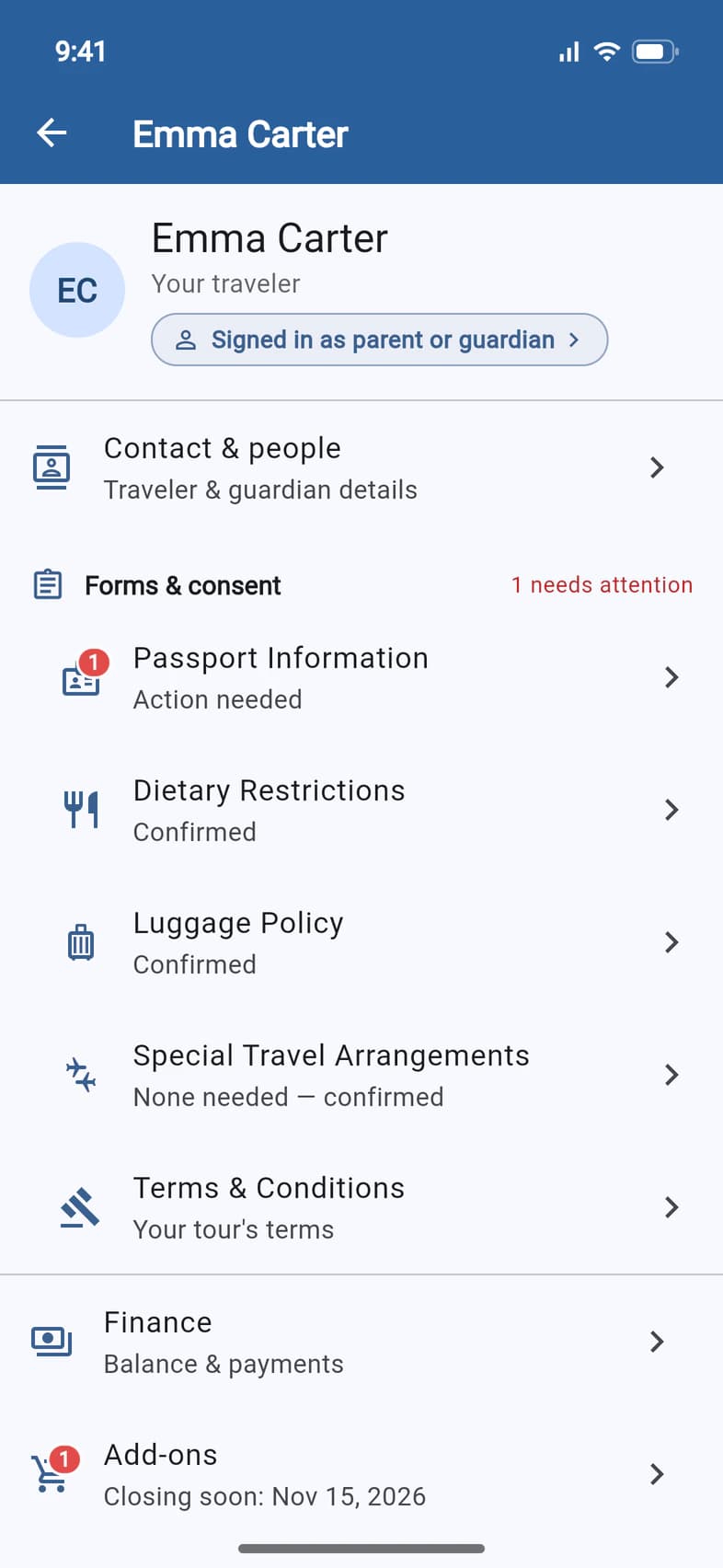
Under your traveler's name, a line says who you're signed in as: here, Signed in as parent or guardian 1. Tap it to open Sign-in & Finance.
A student signed in with their own email sees Signed in as the traveler.
- Step 2
Find your sign-in email
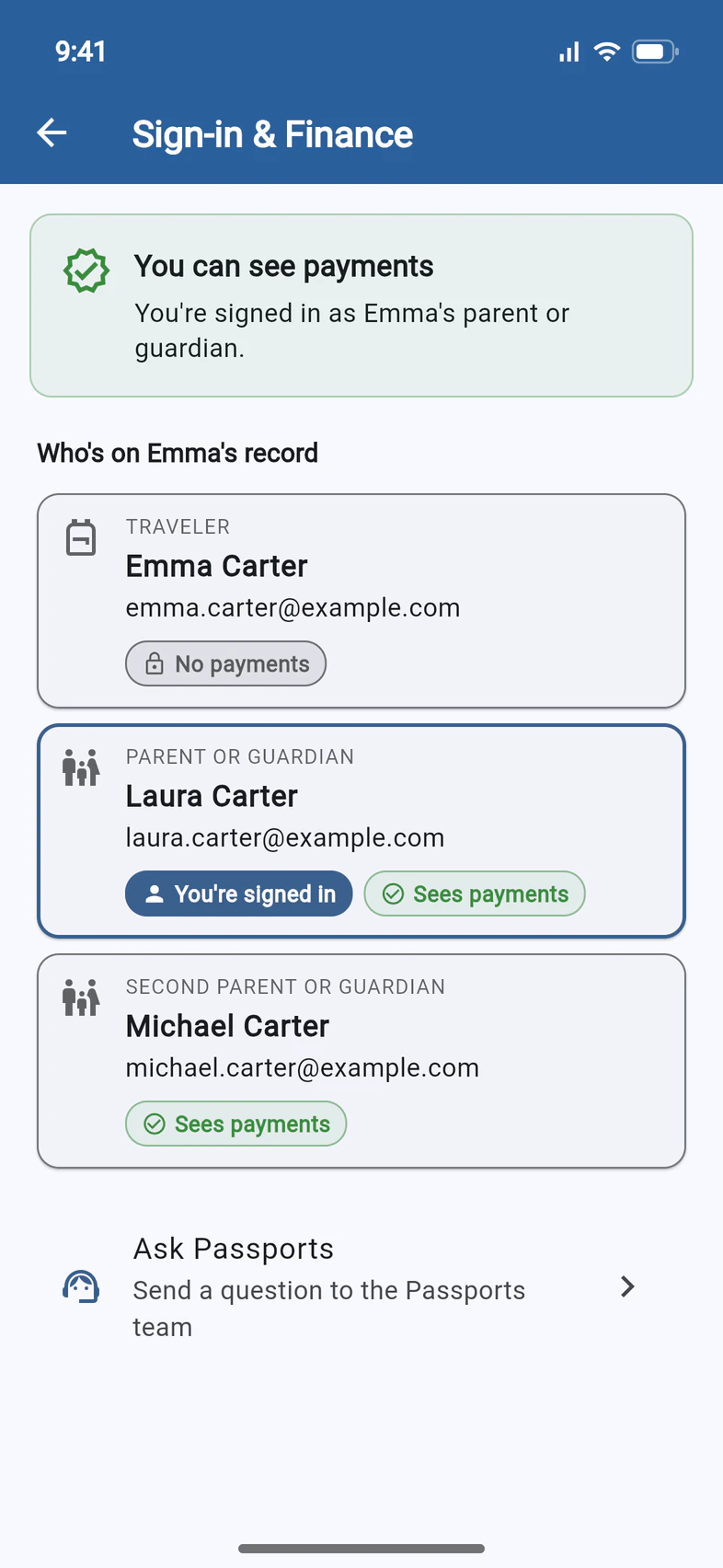
The card at the top says where you stand: here, You can see payments 1.
Below it, there's a card for each person on the record, with the email they sign in with. Sign in with the address on your own card, the one marked You're signed in 2. Everyone else uses the address on theirs.
Each card also says who sees the balance and can pay: Sees payments, or No payments 3.
Not signed in yet? Parents and guardians use the email from their traveler's enrollment, the one Passports emails go to. Travelers use the email given for them when they enrolled.
- Step 3
Student: tap the locked Finance
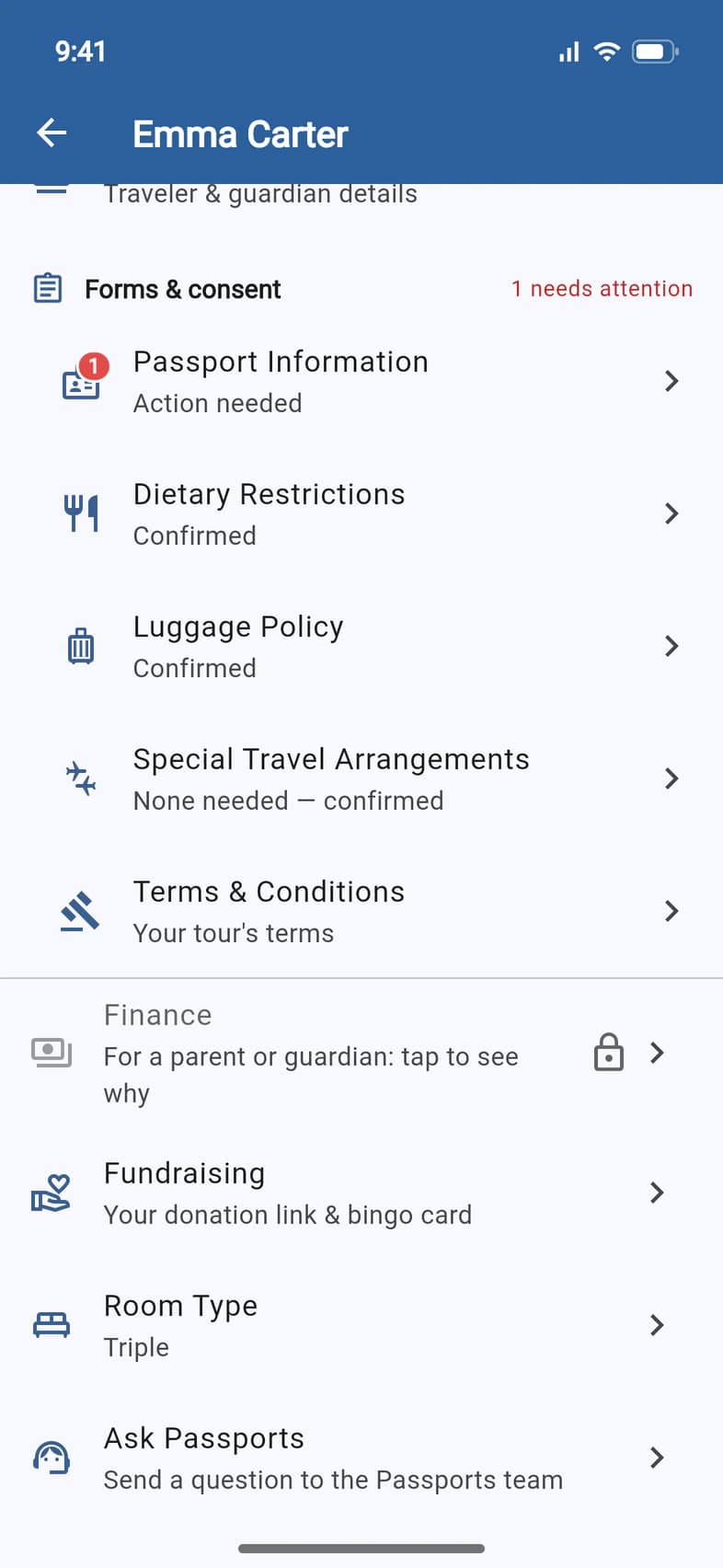
Signed in with a student's own email, Finance is grayed out with a lock and says For a parent or guardian: tap to see why 1.
Tap it. It opens Sign-in & Finance, too.
- Step 4
See who sees payments
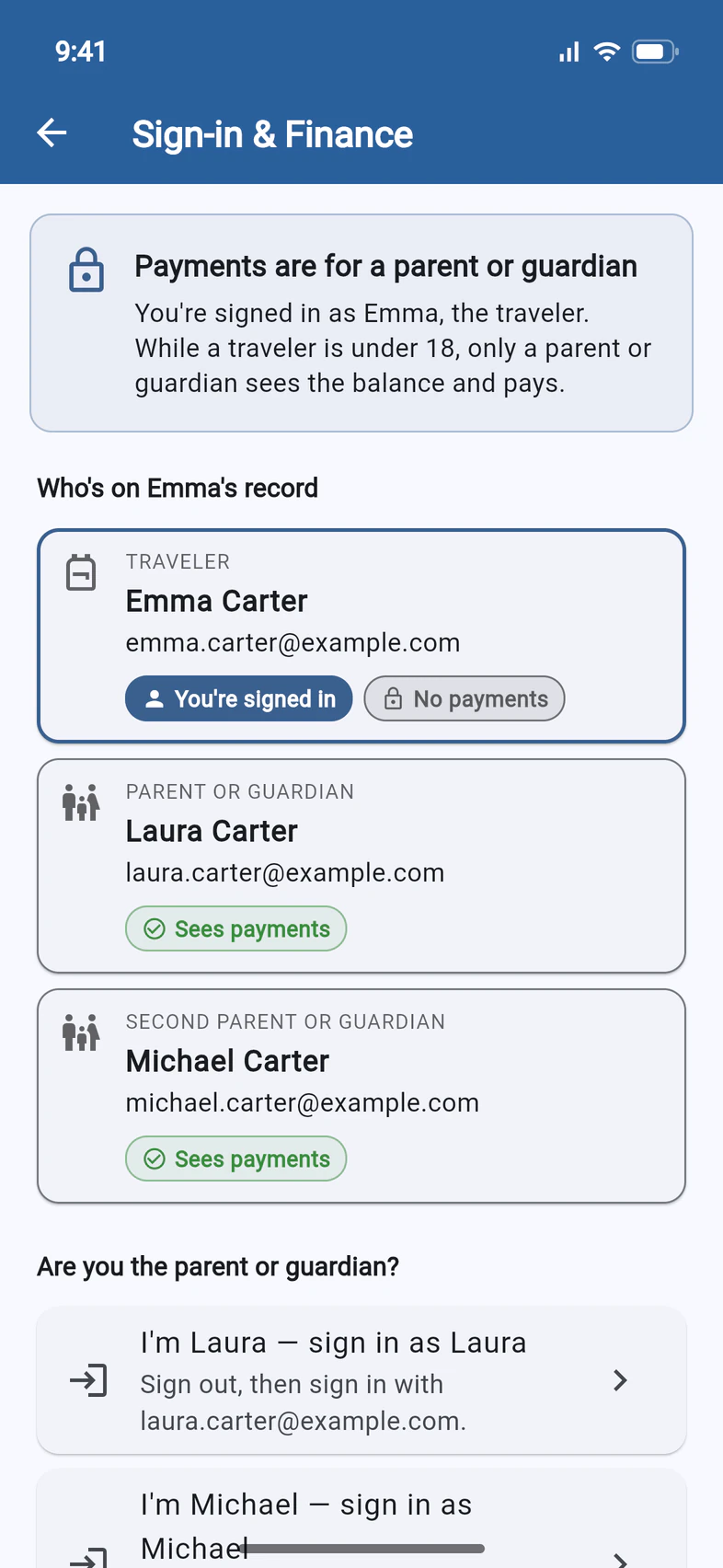
Payments are for a parent or guardian 1: while a traveler is under 18, only a parent or guardian sees the balance and pays. So the student's card says No payments 2, and each parent's says Sees payments 3.
Nothing is wrong with the student's sign-in. To pay, a parent signs in with their own email.
- Step 5
Parent: sign in as yourself
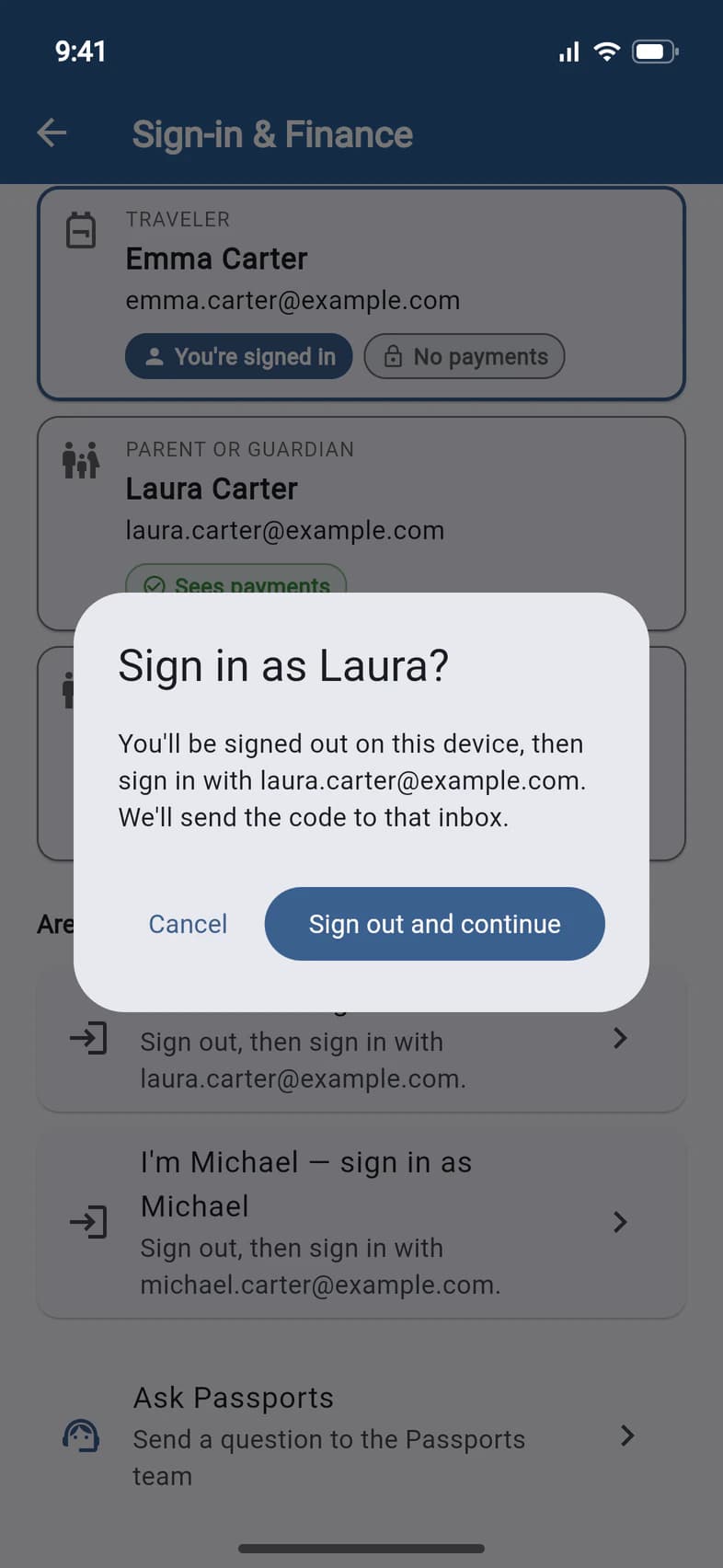
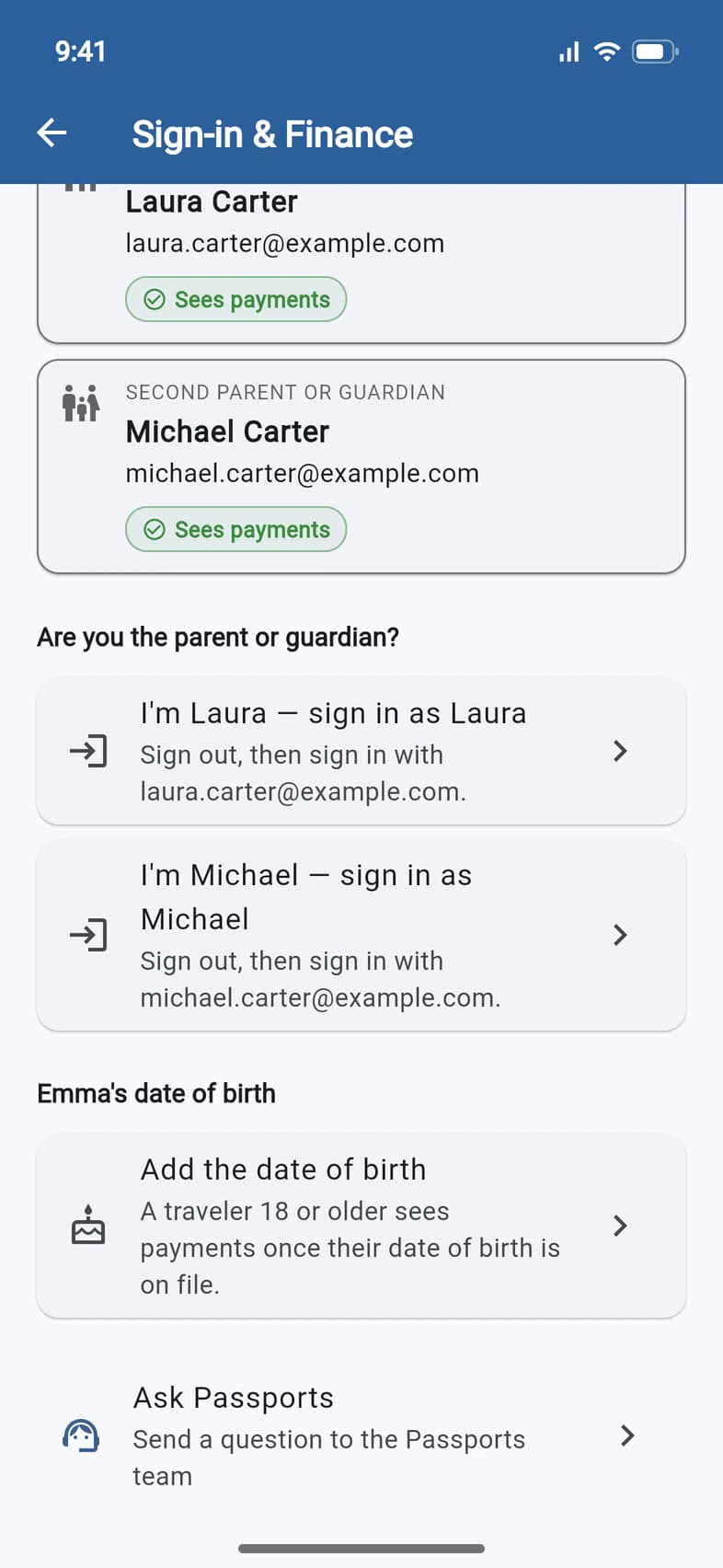
On your student's phone, or signed in with their email? You can't change anything from their sign-in, but you can switch to yours. Under Are you the parent or guardian?, tap the card with your name: I'm … — sign in as ….
PassportsGo says what happens next 1. Tap Sign out and continue 2.
The sign-in screen opens with your email filled in. Tick the terms box and tap Continue. The code goes to that inbox, not your student's, so you need to be able to open it. If Passports has your mobile number, you can choose a text instead.
This signs the student out on this device. To use it as the student again, sign out and sign in with the student's email.
- Step 6
Sharing an email? Say whose
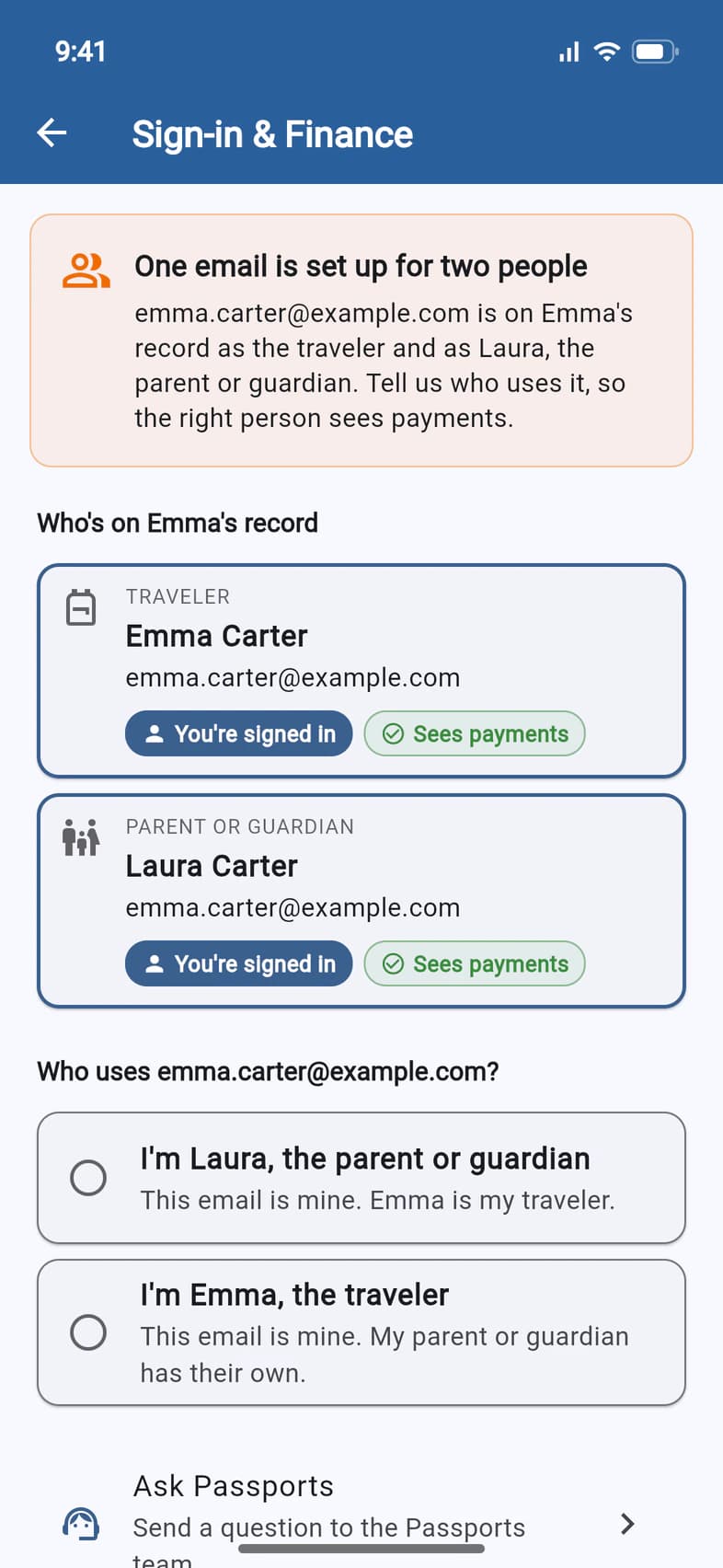
When one address is on the record for both the traveler and a parent, the line under the name turns amber: Signed in as traveler and parent: same email. The page says One email is set up for two people 1, and both cards say You're signed in, so whoever uses that address sees payments.
Under Who uses …?, tap the answer that's true 2: I'm …, the parent or guardian if the email is the parent's, or I'm …, the traveler if it's the student's.
- Step 7
Give each person an email
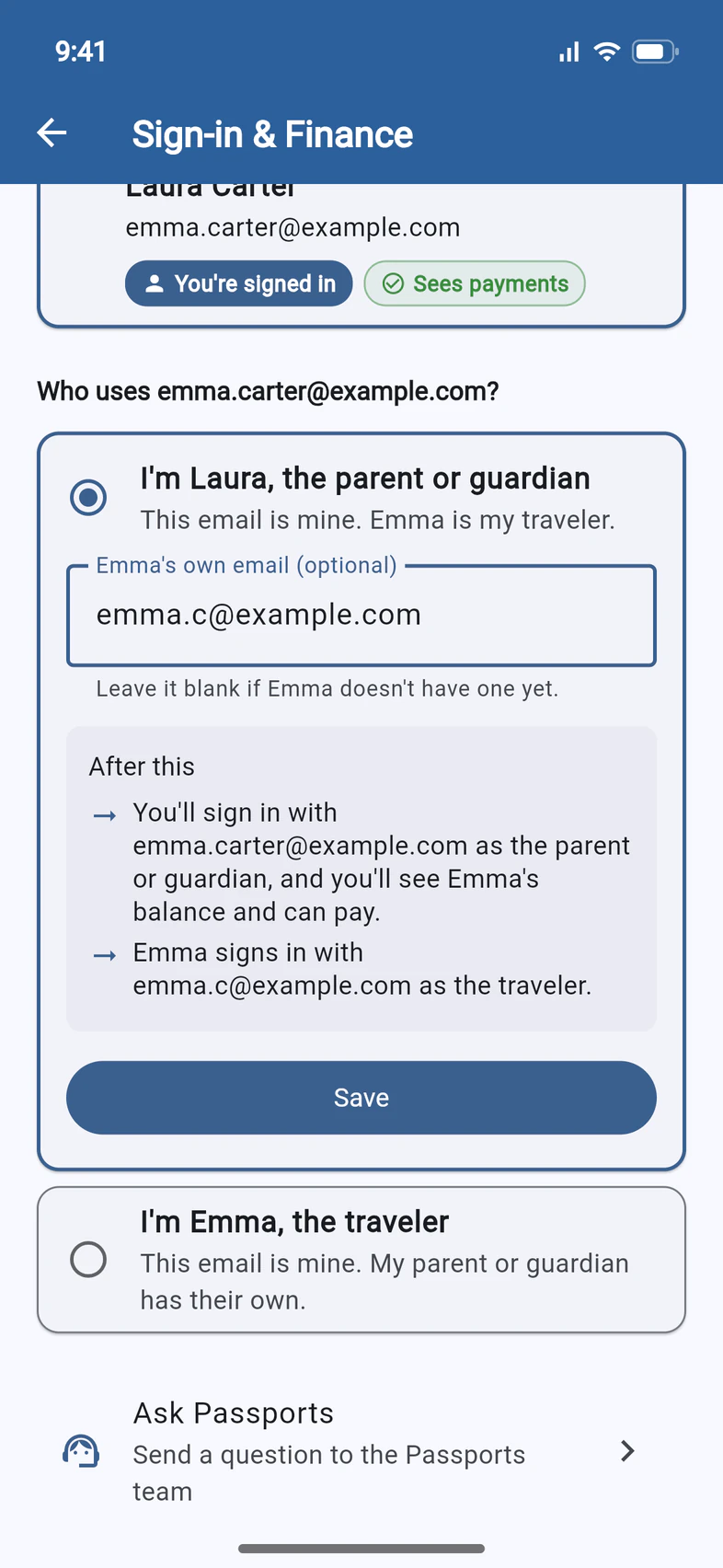
Your answer opens a box for the other person's email:
- I'm …, the parent or guardian 1: the shared address stays yours. Type the student's own email 2, or leave it blank if they don't have one yet.
- I'm …, the traveler: the shared address stays the student's. Type Your parent's or guardian's email. This one is required.
After this 3 says what each person will be able to do, before anything changes. When it's right, tap Save 4.
If the address became the parent's, you see You are now the parent or guardian, and PassportsGo reloads so you see the balance and can pay. If it stayed the student's, Saved tells you the parent can now sign in with the new address. Let them know!
Mistype the end of an address, like gmial.com? A Use … link with the corrected address appears under the box. Tap it.
- Step 8
18 or older? Say who pays
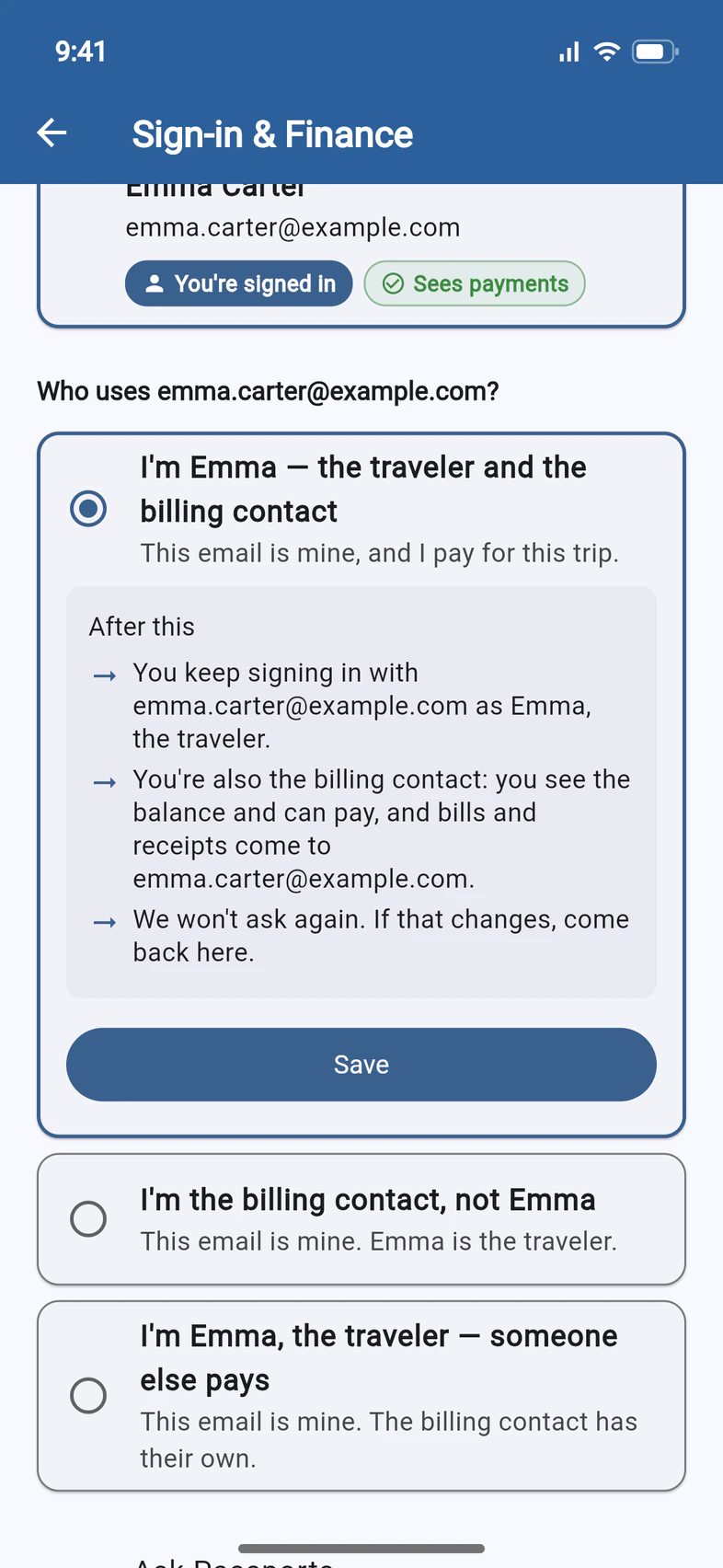
When a traveler 18 or older shares an email with the billing contact, the line under the name says Signed in as traveler and billing contact: same email. The top of the page says You're the traveler — and the billing contact? and asks Are you both?
If you pay for your own trip, tap I'm … — the traveler and the billing contact 1. No email changes. After this 2 says what it means: you keep signing in the same way, you see the balance and can pay, and bills and receipts come to you. Tap Save 3.
The line under your name then reads Signed in as the traveler · billing contact, and PassportsGo doesn't ask again.
Someone else pays? Tap I'm …, the traveler — someone else pays and give their email. If the email belongs to the person who pays, tap I'm the billing contact, not …. If you said you're both and that changes, these two stay on the page under Not right?. A traveler under 18 never gets the "both" answer.
- Step 9
Add a missing date of birth
Signed in with a traveler's own email, and Passports has no date of birth for them? Finance says Needs a date of birth: tap to see why, and the page opens with Finance needs a date of birth.
Scroll down and tap Add the date of birth 1. On Edit contact, fill in Date of birth and tap Save. An empty date of birth can always be filled in.
A traveler 18 or older then sees Finance. Under 18, it stays with the parent or guardian.
Good to know
Does my student see the balance?
Not while they're under 18 and sign in with their own email: Finance is locked for them. From 18 they see it too, once their date of birth is on file. A student who signs in with the same email as a parent sees everything that email sees, so give them their own, as in step 7.
I changed the email. What now?
From now on, each person signs in with their own address, and the code goes to that inbox. If you gave someone a new address, tell them. If you left the student's email blank, they have no sign-in of their own until it's added, and Passports can add it.
Once each person has their own address, the page doesn't offer the answers again. If you typed a wrong address, use Ask Passports to get it fixed.
It says No parent or guardian email is on file.
Then nobody can see the balance or pay in the app yet, and Finance says No parent or guardian email on file: tap to fix. Tap it, and under Who are you? tap I'm …, the traveler and type a parent's or guardian's email. If the address you signed in with is really the parent's, you may also see I'm …, the parent or guardian.
A traveler 18 or older sees No billing contact email is on file instead. They can already see the balance, and can add the email of someone else who pays.
Finance isn't on the page at all.
When the school pays for the trip, Finance doesn't appear for anyone. If it's missing for someone who should have it, call Passports at 1-800-332-7277: they can turn it on for that person.
My code doesn't arrive.
See Fix sign-in trouble: a code that doesn't come, a link that has expired, or no tour after you sign in.
None of these fit, or I just want a different email.
Emails can't be changed in Edit Profile or Contact & people. For anything Sign-in & Finance doesn't offer, scroll to the bottom of the page and tap Ask Passports: your question goes to the Passports team with your traveler's name on it. Or call Passports at 1-800-332-7277, Monday to Friday, 8am–4pm Eastern.
Screens show a sample family and tour — your names, dates and amounts will differ. Checked against the app November 5, 2026.
Call us. A real person in Worcester picks up.
Monday to Friday, 8am to 4pm Eastern — and around the clock once your group is on tour. Or email passportsgo@passports.com.