
How the Recruitment tab works
Your enrollment page, Tour ID and QR code, ready-to-paste messages, printed materials and your interest list — in one place.
Everything you need to fill your trip, in one place: how enrollment is going, the one thing worth doing next, ready-made ways to share your tour, and the families on your list.
On Home, tap Recruitment, or on Admin, tap Recruitment Hub. Both are there until 60 days before departure.
- Step 1
See how enrollment is going
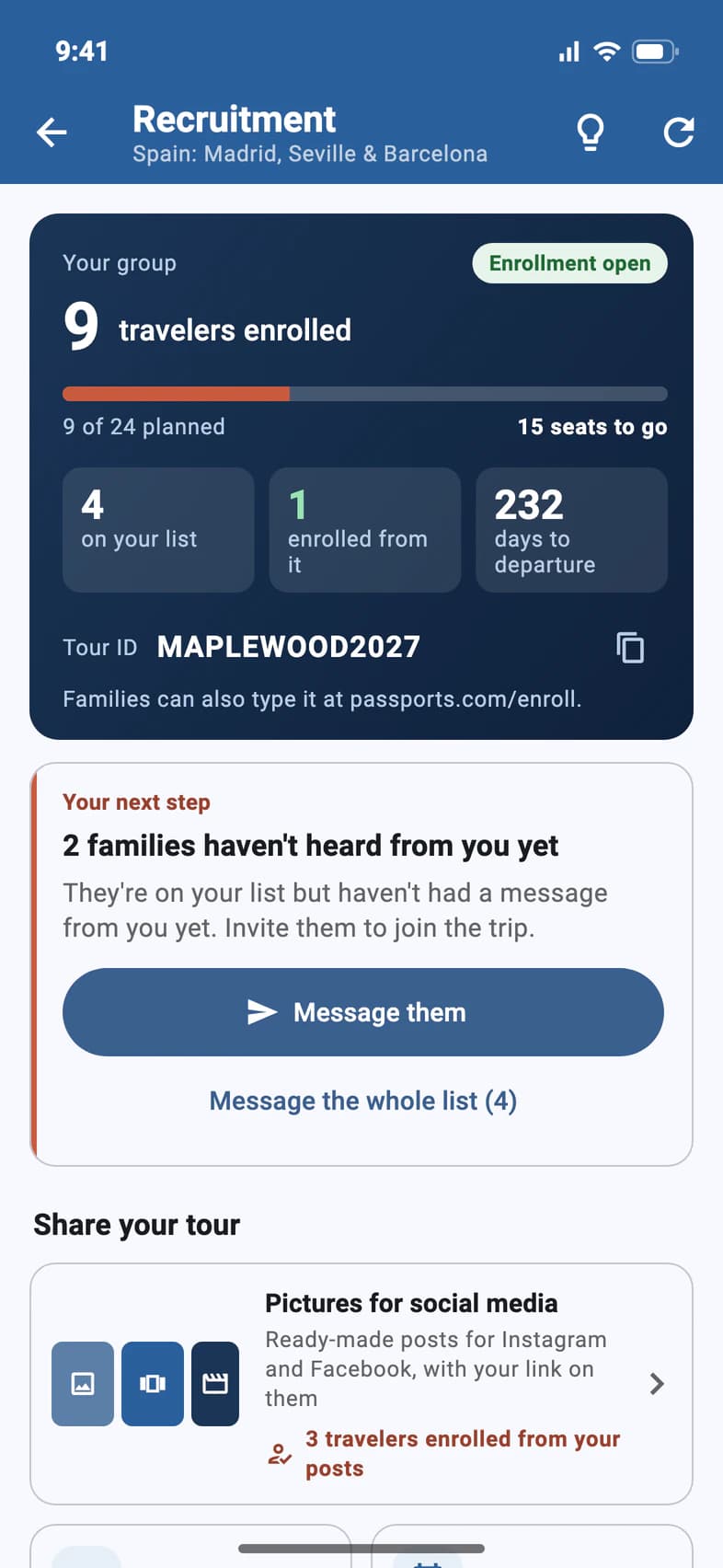
Your group 1 shows how many travelers have enrolled against the size you planned, how many seats are left, and whether enrollment is open. Under it: how many people are on your list, how many of them have enrolled, and the days to departure.
Families can enroll with your Tour ID 2 at passports.com/enroll. Tap the copy button next to it to paste it anywhere.
Tap the light bulb at the top for Recruiting tips: what the groups that fill every year do.
- Step 2
Take your next step
Your next step 1 suggests the one thing most worth doing now, with one button 2:
- Add contacts while your list is empty: see Build your interest list.
- Message them when families on your list haven't heard from you yet, like the ones who signed up on your enrollment page. Message the whole list is under it.
- Plan an info night when you have no meeting planned.
- Otherwise Message the list: see Message your interest list.
Once you've planned a meeting, Your next meeting shows under the card.
When messages can't go out (enrollment has closed, your Tour ID isn't set up yet, or messages aren't switched on for your group), the card says why instead, and its message button is greyed out.
- Step 3
Share your tour
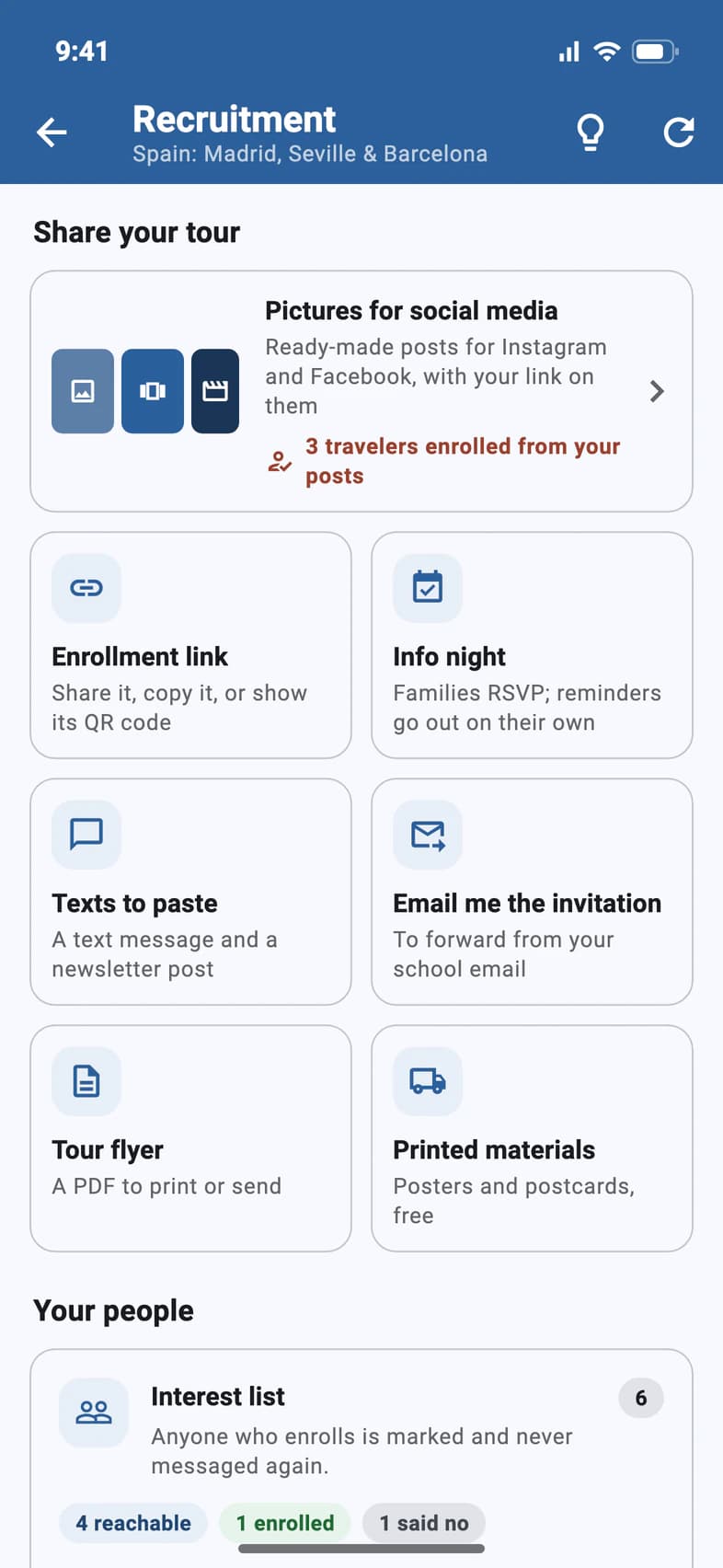
Each tile under Share your tour opens what you need:
- Pictures for social media 1: ready-made Instagram and Facebook posts about your trip, with your enrollment link on them. Once families enroll from your posts, the tile counts them, as in "3 travelers enrolled from your posts". See Share your tour on social media.
- Enrollment link 2: your enrollment page, with the itinerary, pricing, payment plans and the enrollment form. Share it, Copy link, show its QR code on a slide or a poster, or Preview it.
- Info night: plan a meeting families RSVP to. It's there while you have no meeting planned.
- Texts to paste 3: a text message and a newsletter or social post, already written with your trip and your link.
School email often blocks mail from outside the district. Tap Email me the invitation 4, then the Email me the invitation button: Passports emails you the full invitation, with photos, dates, hotels and the enrollment button, to forward to families from your own account.
- Step 4
Order printed materials
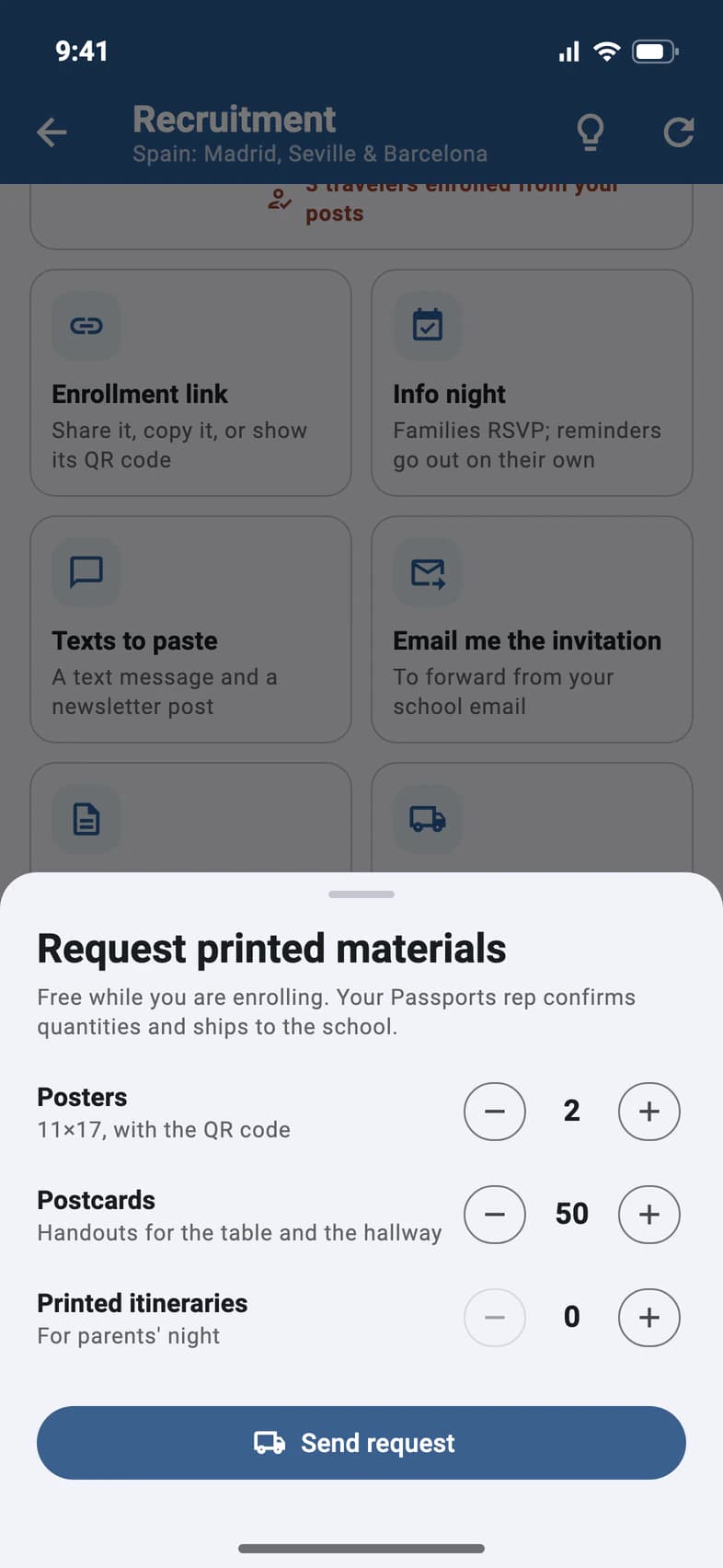
Tap Printed materials for free posters, postcards and printed itineraries for a parents' night. Set how many you want of each 1, then tap Send request 2. Your Passports rep confirms the numbers and ships them to the school.
Need copies today? Tour flyer opens your trip's flyer in the app. Tap Print, or Share to send it by email or text (on a computer, Download).
- Step 5
Watch your interest list
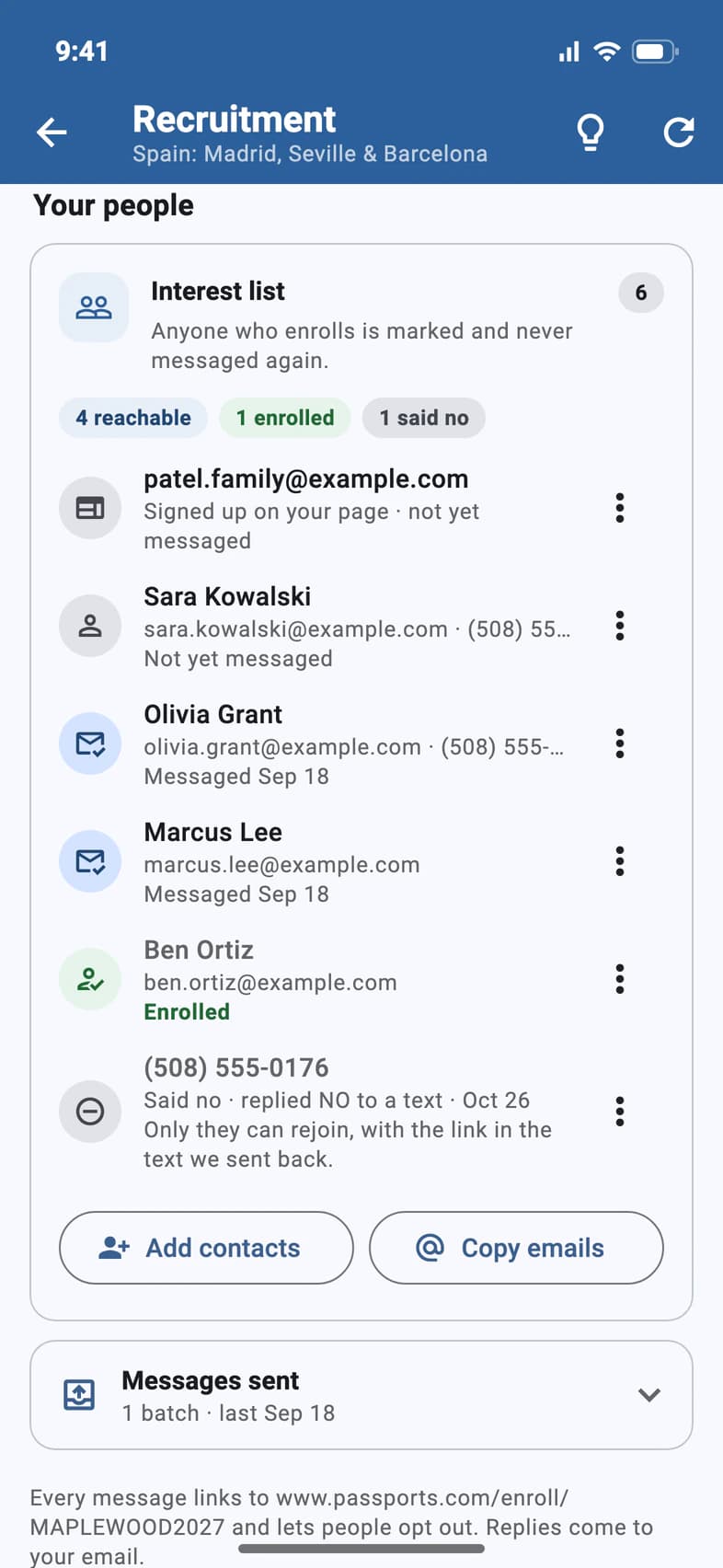
Under Your people 1, the Interest list holds the families you add and the ones who sign up on your enrollment page 2. The counts at the top say how many you can reach, how many have enrolled and how many said no, and each row shows whether you've messaged them yet.
Anyone who enrolls is marked Enrolled 3 and never gets another recruitment message. Someone who replied NO to a text, or used the link in our email, shows Said no 4: they're off the list, and only they can put themselves back.
Add contacts and Copy emails are under the list, and Messages sent opens the list of what you've sent.
Good to know
I don't see Recruitment on Home.
It shows to the group leader, and to a chaperone or visitor you've given Can use Recruitment, until 60 days before departure, on Home and as Recruitment Hub on Admin, and it's being turned on group by group. Still missing? Ask Passports.
Can someone help me with this?
Yes. Turn on Can use Recruitment for a chaperone or a visitor: see Let someone help you recruit. They get this page without Printed materials or Info night, and their messages are signed with their own name.
Someone said no. Can I add them back?
No. Replying NO to one of our texts, or Take me off the list in one of our emails, takes them off this trip's list, and only they can put themselves back, with the link in the text we sent back or in our email. Pasting them in again doesn't add them. Replying STOP only stops our texts.
Do the printed materials cost anything?
They're free while you're enrolling.
Where does Email me the invitation send it?
To the email address you sign in with. A message confirms where it went; it can take a few minutes to arrive. Then forward it to your families. Once enrollment closes, the button is greyed out.
What's in the tour flyer?
A one-page flyer for your trip, the day-by-day list with a QR code families scan to enroll, and the full itinerary. It's also on the Tour tab.
Screens show a sample family and tour — your names, dates and amounts will differ. Checked against the app November 3, 2026.
Call us. A real person in Worcester picks up.
Monday to Friday, 8am to 4pm Eastern — and around the clock once your group is on tour. Or email passportsgo@passports.com.