
Post an announcement
Post once on Updates — with photos, PDFs, links or a poll — and choose who sees it and who gets notified.
Post once on Updates and your whole group hears about it. Everyone who can see the post gets an email right away, and push notifications follow the clock, so nobody at home is woken in the middle of the night.
You decide whether parents at home and your Tour Director see it, and you can add photos, PDFs, links or a quick poll. One post at a time can be pinned to the top of Updates and Home.
The whole announcement, from writing it to who’s read it
Post on Updates with a title, a message and a poll, choose who sees it and know when each family is notified, then see the votes, the comments and who hasn't read it yet, and edit or delete it.
Real app screens, sample tour · narration generated with AI
Before you start
- PassportsGo on your phone, or passportsgo.com in a browser — signed in as the group leader, or as someone you've made an admin.
- Step 1
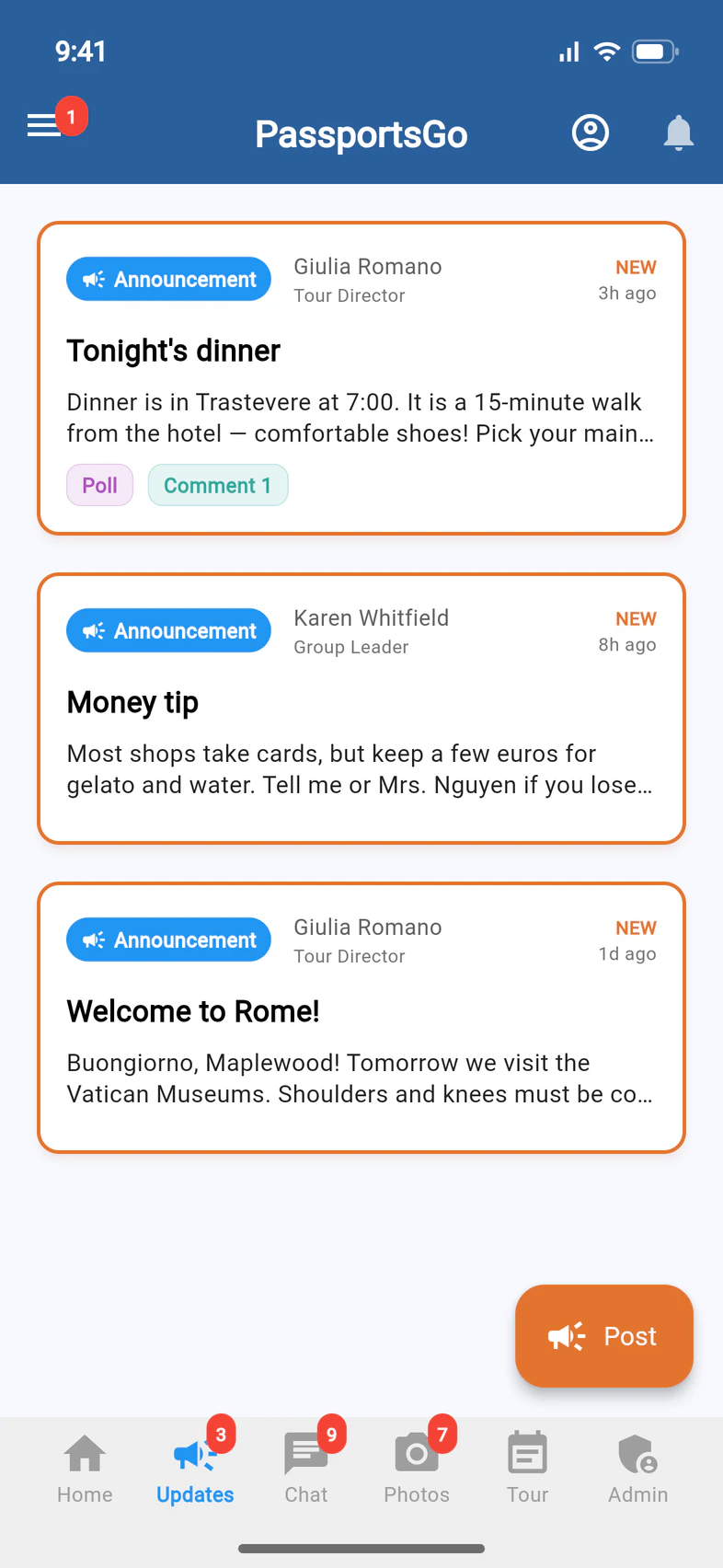
Open Updates and tap Post
Tap Updates 1 at the bottom of the screen, then the orange Post button 2.
Only group leaders and the admins they choose see Post. It also goes away once a group becomes read-only after the trip.
- Step 2
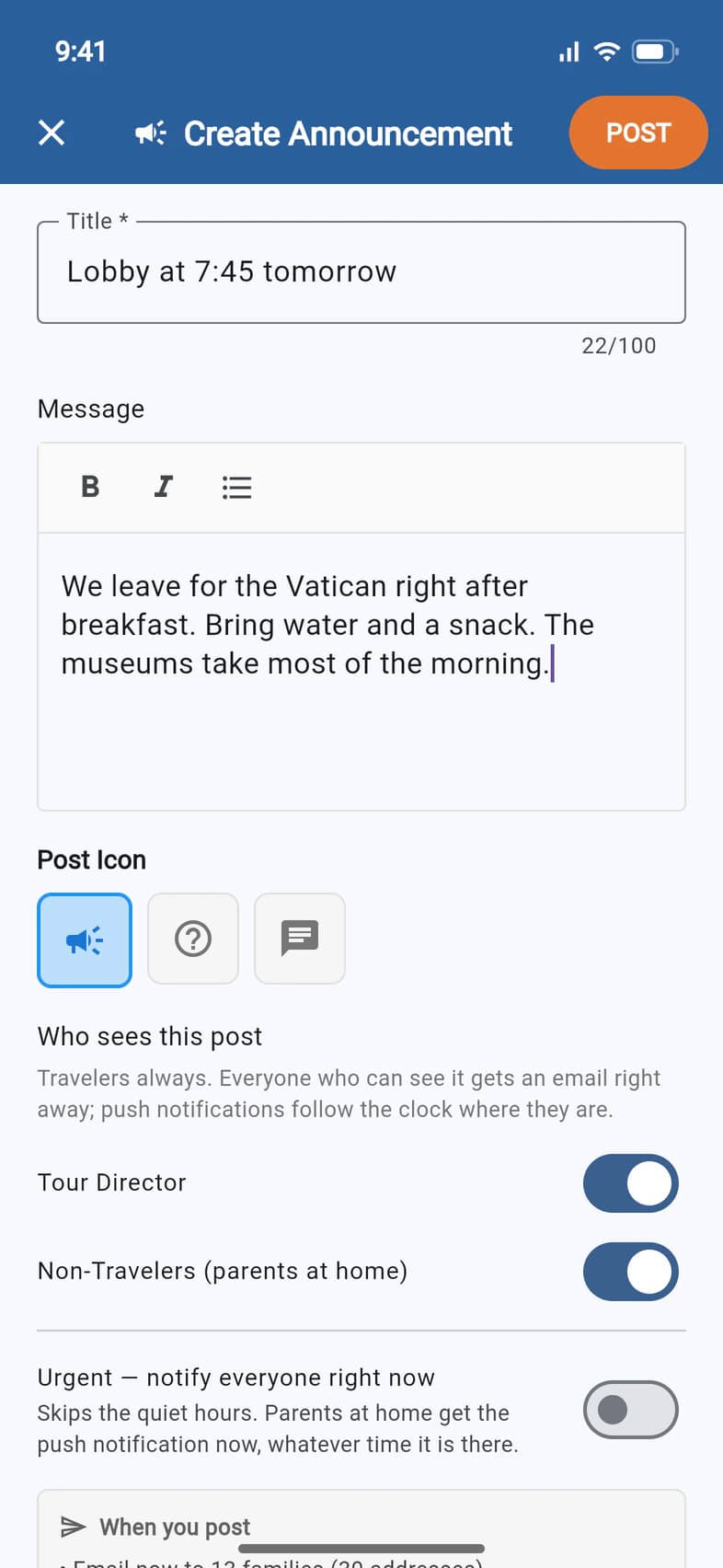
Write a title and message
Give your post a short Title 1. It's the first thing people see: in the list, in the email subject and in the notification.
Then write the details under Message 2. The buttons above it make text bold, italic or a bulleted list.
Under Post Icon you can mark the post as a Question or a Discussion instead of an Announcement. The label on the post changes to match.
- Step 3
Choose who sees it
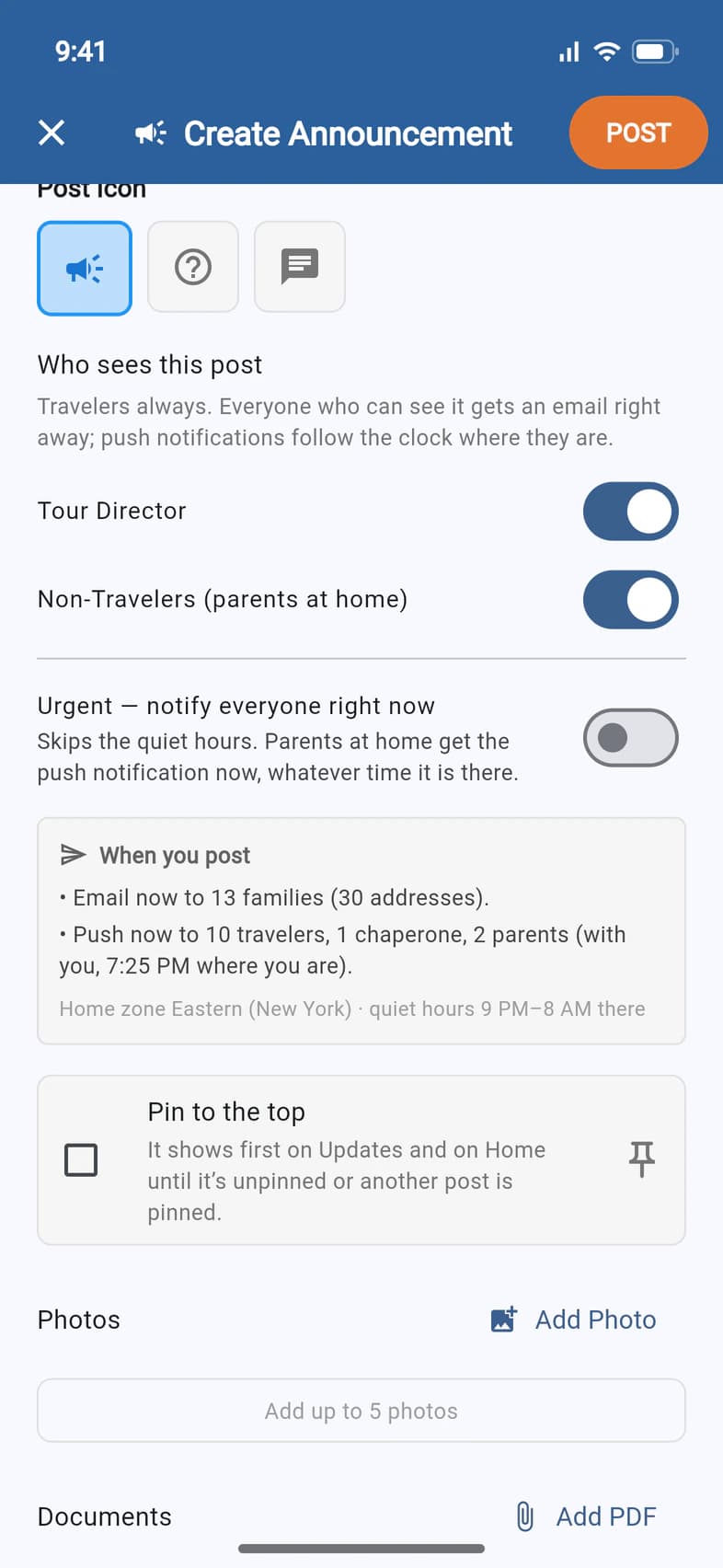
Scroll to Who sees this post. Travelers always see your post. Two switches decide who else does:
- Tour Director 1
- Non-Travelers (parents at home) 2
Everyone who can see the post gets an email right away. Everyone with PassportsGo on their phone also gets a push notification. During the tour, the people traveling with you get it right away. Everyone at home gets it right away too, unless it's the middle of the night in your group's home time zone (quiet hours are 9 PM to 8 AM), in which case it waits until 8 AM. That includes parents, and before the trip, travelers too.
The When you post box 3 spells out exactly who gets what, before you post.
Urgent — notify everyone right now skips the quiet hours: parents at home get the push notification immediately, whatever time it is there. Keep it for news that can't wait until morning.
- Step 4
Add photos, PDFs, a link or a poll
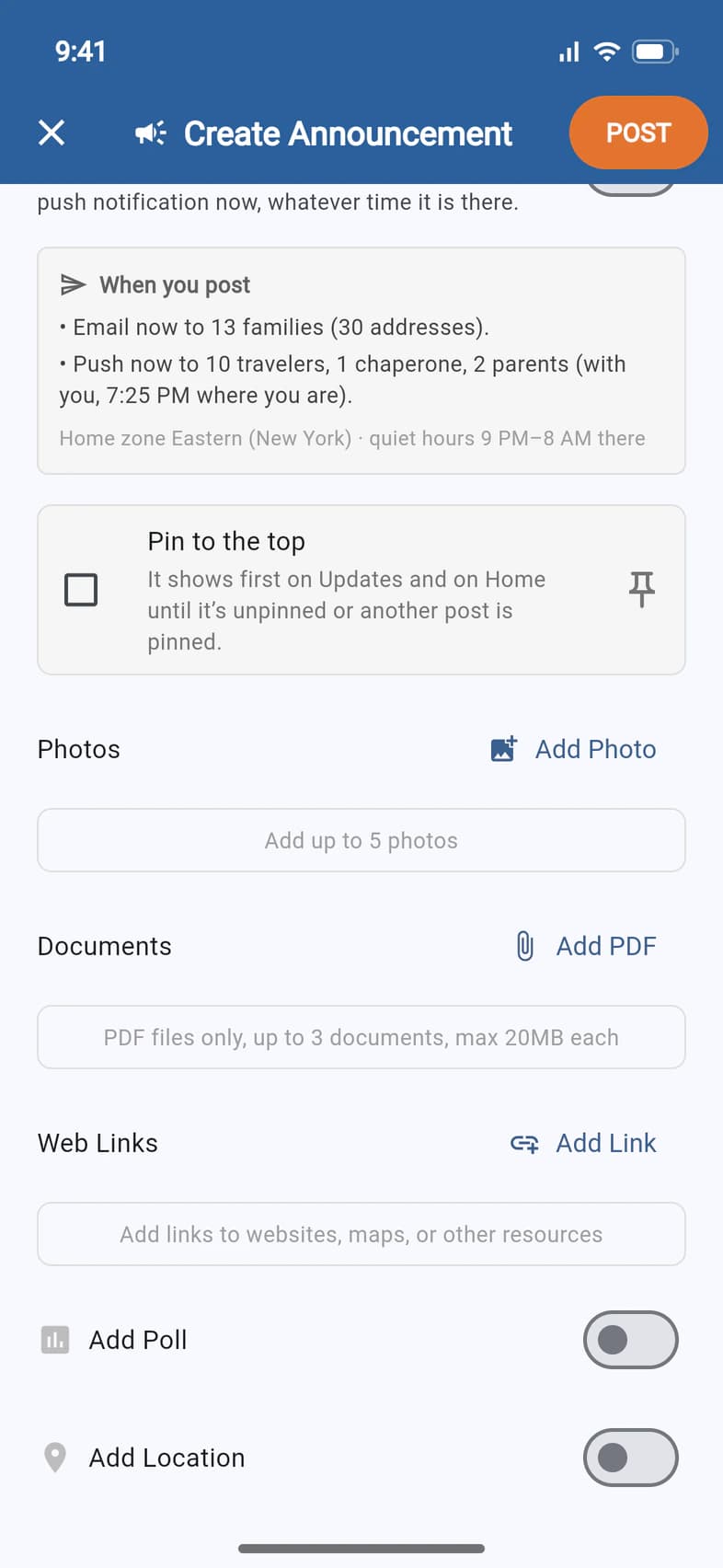
All optional. Keep scrolling for:
- Add Photo 1: up to 5 photos.
- Add PDF 2: up to 3 PDF files, 20 MB each — a packing list or a permission form, say.
- Add Link 3: a website, a map or an online form.
- Add Poll 4: turn it on and your title becomes the question. Add at least two options, then choose whether people can pick more than one and when they see the results.
- Add Location: attach where you are right now, shown on a map.
Above Photos, tick Pin to the top to keep this post first on Updates and on Home until it's unpinned or another post is pinned. One post is pinned at a time, and pinning sends nothing extra.
- Step 5
Tap POST
When it looks right, tap POST 1 at the top right.
A post goes out the moment you tap POST. There's no scheduling.
- Step 6
You're done
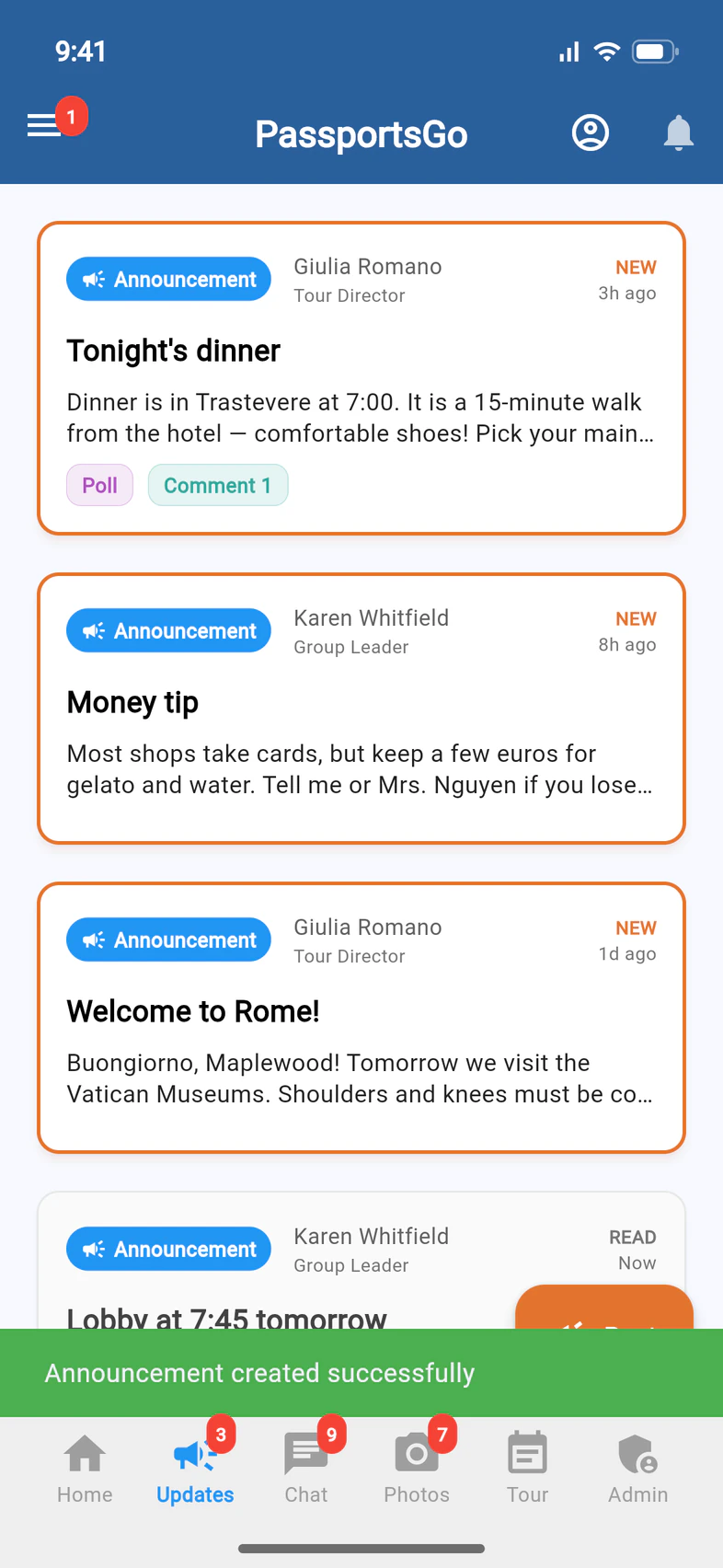
A green Announcement created successfully message confirms it, and your post is on Updates 1.
Everyone else sees it at the top of their list, marked NEW, until they open it. On your own list it's marked READ, so it sits below any posts you haven't opened yet.
To fix a typo, delete it, pin it to the top or see who has read it, open the post and tap the ⋮ menu.
Good to know
Who gets notified, and how?
Everyone who can see the post gets an email right away. Everyone with PassportsGo on their phone also gets a push notification, right away too, except people at home between 9 PM and 8 AM in your group's home time zone: theirs waits until 8 AM, unless you turn on Urgent. During the tour, the people traveling with you always get it right away. The When you post box shows the exact numbers before you post.
Can I schedule a post or pin it to the top?
You can't schedule one: a post goes out as soon as you tap POST. You can pin one: tick Pin to the top as you write it, or open a post and tap ⋮ › Pin to top. It shows first on Updates, and as a PINNED card on Home, for everyone who can see it, until you tap ⋮ › Unpin or pin another post. Pinning sends no new notification. Below it, each person's unopened posts come first, newest on top.
Can people reply?
Yes. Anyone who can see the post can open it and add a comment underneath.
Do families get a text?
No. A post goes out by email, and as a push notification to everyone with PassportsGo on their phone. A family without the app gets the email only.
Can my chaperones post announcements?
Yes, once you make them an admin. Admins see the same Post button you do.
I don't see the Post button.
Only group leaders and admins can post, and posting stops once a group is read-only after the trip. If you're the group leader and it's missing, call Passports at 1-800-332-7277.
Screens show a sample family and tour — your names, dates and amounts will differ. Checked against the app October 12, 2026.
Call us. A real person in Worcester picks up.
Monday to Friday, 8am to 4pm Eastern — and around the clock once your group is on tour. Or email passportsgo@passports.com.