
Waitlists and declined cards
What each message means — and why you should never submit the form twice.
Most enrollments end with "Congratulations!". This guide covers the other endings: a waitlist, a declined card, or a page that stops before it's done. Each one tells you what to do next. Do that, rather than starting the form over with changed details.
- Step 1
A waitlist-only tour
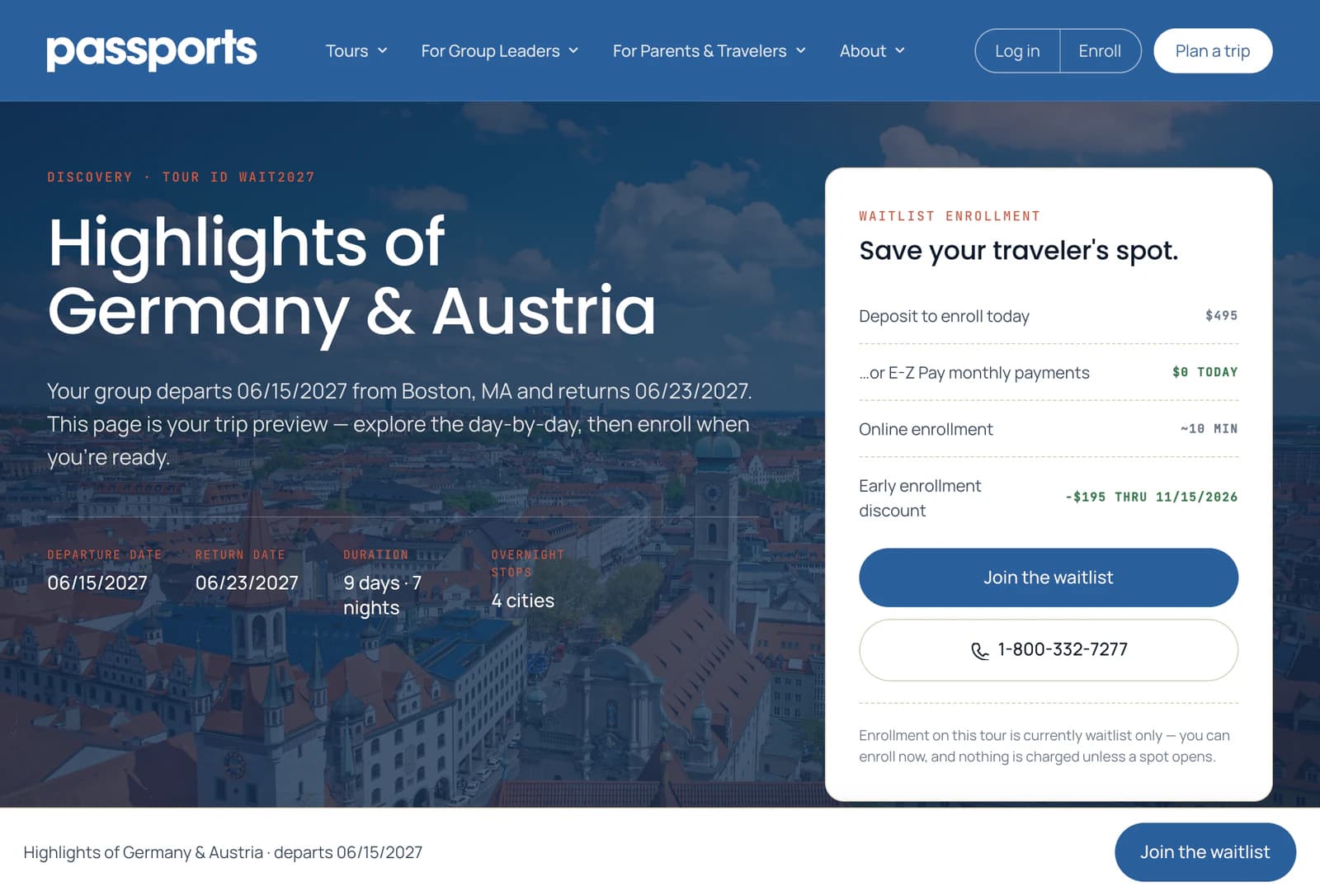
When a tour is waitlist-only, the button on its page reads Join the waitlist 1, and the note under it says so 2. You apply the same way: traveler, protection, payment plan and the agreements.
- Step 2
On the waitlist
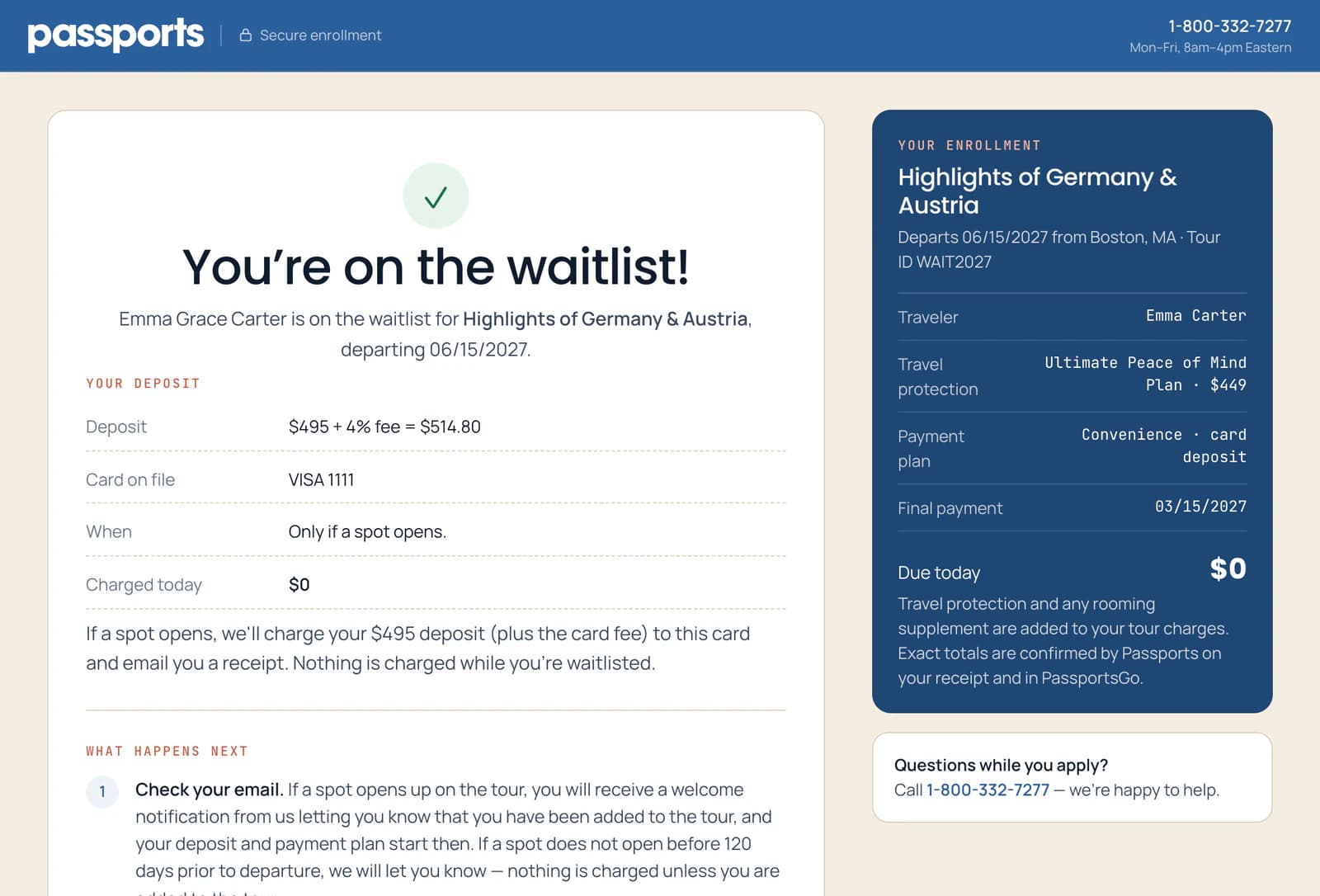
After you apply, the page says You're on the waitlist! 1. Your card or bank account is kept on file, and nothing is charged while you wait 2. If a spot opens, your deposit is taken then and we email you.
If no spot opens, we let you know, and nothing is charged unless your traveler is added to the tour.
- Step 3
If your card is declined
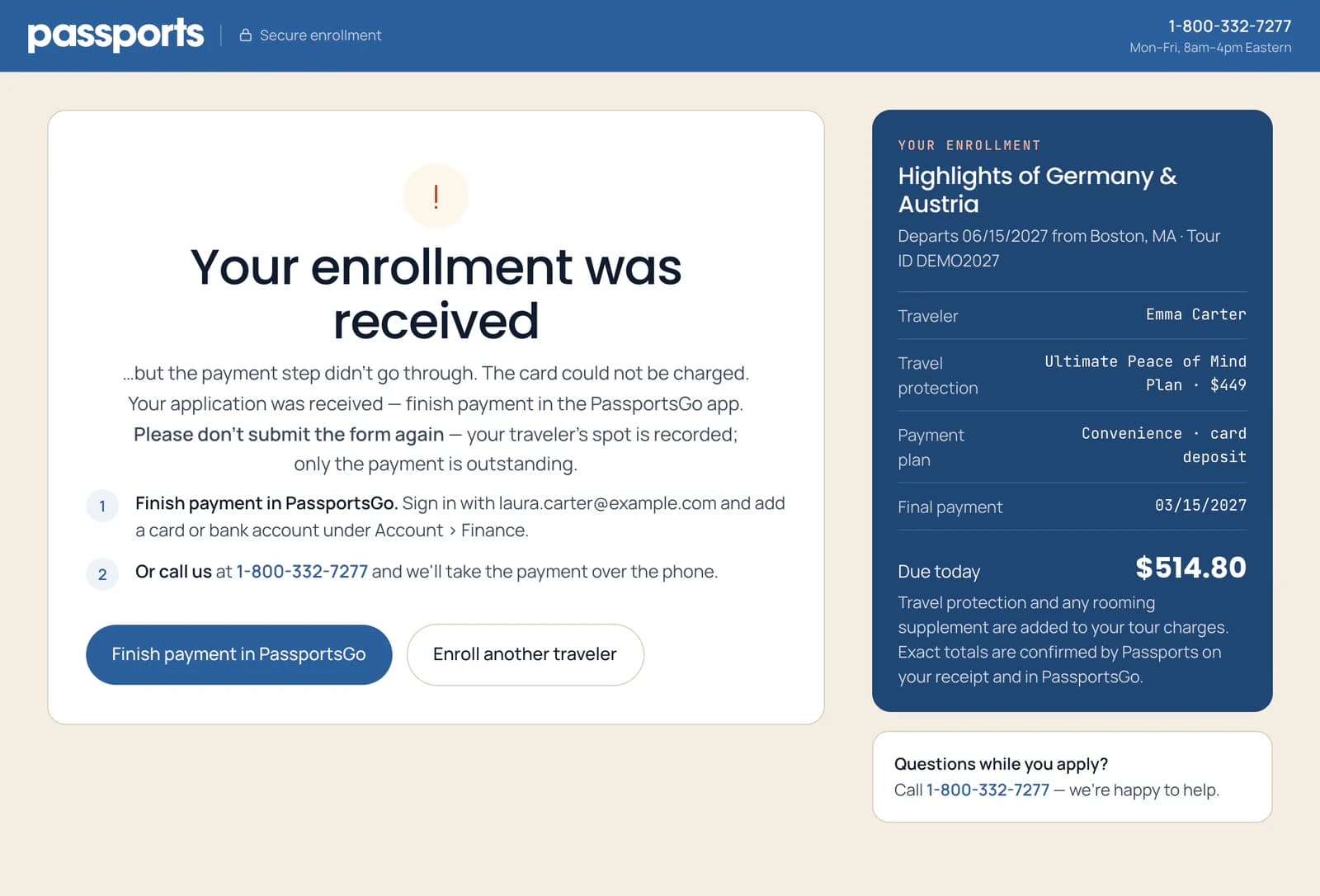
Your enrollment was received means your traveler's spot is recorded: only the payment is missing. Don't submit the form again 1.
Instead, click Finish payment in PassportsGo 2, sign in, and pay under Account › Finance with another card or a bank account. Or call Passports at 1-800-332-7277 to pay by phone.
The form remembers what you typed on this device, so it may open filled in next time. Don't send it again: your traveler is already enrolled.
- Step 4
If the page stops
If the page says "Checking on Emma's enrollment…", with your traveler's name, keep it open: it is checking with us on its own and will show your confirmation as soon as it can, usually within a minute or two.
We couldn't confirm your enrollment means the page didn't get an answer in time, so it can't tell whether your enrollment went through. Click Try again: it sends exactly what you entered, and if your first try reached us we recognize it, so your traveler isn't enrolled twice and you aren't charged twice. If an email from Passports about the enrollment arrives first, it went through. To change anything first, call Passports at 1-800-332-7277.
Your enrollment is still processing means we have it and are finishing it. Watch for the email, or click Try again when the button unlocks to see your confirmation.
This page needs a refresh means the website was updated while the page was open, so nothing was sent. Click Reload the page and submit again: most of your answers are still filled in.
We've received your application with a request to call means your application reached us but our system couldn't finish it, so our team will. Don't submit it again or start a new one: call Passports at 1-800-332-7277, Monday–Friday, 8am–4pm Eastern, and we'll finish it with you.
We couldn't complete your enrollment means it didn't go through and nothing was charged. Back to review takes you back to try again.
Good to know
The tour's final payment deadline has passed. Is it still a deposit?
Usually not. Past that deadline, enrollment is waitlist only, and if a spot opens the full tour price is due rather than a deposit. The page says what's due, and nothing is charged while you wait.
Can I use a different card?
Yes, in PassportsGo, not on the enrollment form: Make a payment.
I'm not sure whether it went through.
Look for an email from Passports about the enrollment. If the page offers Try again, use it: a repeat of the same details is recognized, never enrolled twice. Or call Passports at 1-800-332-7277 and we'll check and tell you.
It says "We already have Emma's application".
Your traveler is already on the tour, or on its waitlist, from an earlier application: yours, the other parent's or the traveler's own. There's no need to apply again, and this try changed nothing. The confirmation went to the email address on that first application. Didn't get it, or want to be added as a contact? Call Passports at 1-800-332-7277, Monday–Friday, 8am–4pm Eastern. To apply for a different traveler, click Enroll another traveler.
Screens show a sample family and tour — your names, dates and amounts will differ. Checked against the app November 3, 2026.
Call us. A real person in Worcester picks up.
Monday to Friday, 8am to 4pm Eastern — and around the clock once your group is on tour. Or email passportsgo@passports.com.